Does Goodwill Take Computer Monitors? What They Accept and What They Don't
Table of contents
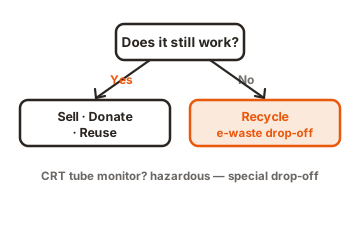
Yes, most Goodwill stores take computer monitors, and you don’t pay a cent to drop one off. There’s one big catch worth knowing before you load up the car: it depends on the type of monitor. A flat-panel screen (the thin LCD or LED kind) is welcome almost everywhere, working or not. An old CRT monitor, the heavy boxy kind with a glass tube, is a different story, and plenty of locations turn those away.
So the short version is simple. Bring in a flat-panel monitor and you’re fine. Bring in a bulky tube monitor and you should call ahead first. The rest of this guide walks through which monitors get taken, how to hand one over, what to do about your data, whether you can write it off on your taxes, and where to turn if your local store says no.
Flat-panel vs. CRT: which monitors Goodwill will take
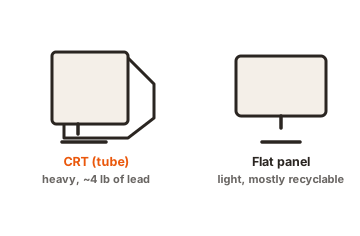
The split comes down to what’s inside the screen. Flat-panel monitors are cheap and safe to recycle, so Goodwill happily takes them. CRT monitors contain leaded glass, which is costly and messy to handle, so many stores won’t.
Here’s how the two types usually break down at the donation door:
| Monitor type | What to expect |
|---|---|
| Flat-panel (LCD / LED) | Accepted at nearly all locations, working or broken, free of charge. |
| CRT (tube / boxy) | Often refused because the leaded glass is expensive to recycle. Call your store first. |
| Cracked or damaged screen | Usually accepted for recycling. Box a broken one so no glass is exposed. |
If you’re not sure which kind you have, look at the depth. A monitor only an inch or two thick is a flat panel. One that’s eight to sixteen inches deep and heavy is a CRT. Most monitors made in the last fifteen years or so are flat panels, so the odds are in your favor.
The weight is another giveaway. A 24-inch flat panel weighs a few pounds, while a CRT of the same screen size can top 30 or 40 pounds. That heft is exactly why tube monitors are a problem to move and recycle, and why some stores draw the line at them. There’s also a practical limit at many donation doors: staff are told to accept only what one person can safely lift, roughly 50 pounds or less. A large tube monitor can bump right up against that rule.
Why the rules change from store to store
Goodwill isn’t one big company. It’s a network of separate regional nonprofits, and each one sets its own donation rules. That’s why one store takes tube monitors while another two towns over refuses them. Local recycling costs, state e-waste laws, and the recycling partners each region uses all shape the list.
A few examples show how much this varies. Some regions run a partnership called Dell Reconnect, a free program that accepts any brand of computer equipment in almost any condition and recycles it responsibly inside the United States. Others have teamed up with different recyclers to take a wider range of electronics, sometimes even old TVs. And a handful spell out plainly that CRT computer monitors are on their “will not accept” list.
State law plays a role too. Some states have covered-device recycling rules that require certain electronics to be collected and kept out of landfills, which pushes local Goodwills to expand what they accept. In those areas you may find a store taking a broader mix of gear, sometimes including televisions, because a recycling partner is set up to handle it. In states without those rules, the list can be shorter.
The takeaway is to check before a big trip. A quick phone call or a look at your local Goodwill’s website tells you exactly what they’ll take that day, and saves you from hauling a heavy monitor back home. It’s a two-minute step that removes all the guesswork.
What happens to your monitor after you donate it
Once you hand over a monitor, it goes down one of two paths. If it works and is recent enough to sell, staff clean it up, test it, and put it on the shelf, either in a store or through Goodwill’s online auction site. Someone in your community gets an affordable screen, and the sale funds job-training and employment programs.
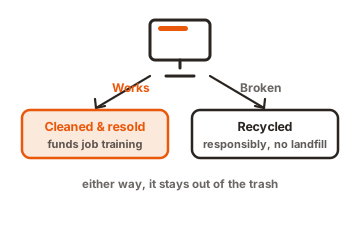
If the monitor is broken or too old to resell, it heads to a recycling partner instead. There it’s taken apart so the metal, plastic, glass, and circuit boards can be recovered and turned into new material. Reputable programs keep this work inside the United States and follow a zero-landfill policy for regulated material, meaning the parts that could harm the environment are handled properly rather than dumped or shipped overseas. Either way, your old monitor does some good on its way out.
How to donate a monitor to Goodwill
Donating a monitor takes about five minutes. Here’s the whole process:
-
Check your local store's policy
Look up the nearest Goodwill and confirm it takes monitors, especially if yours is a CRT. Most sites list accepted electronics. -
Give it a quick clean
Wipe off dust and grime. A tidy, working monitor is more likely to be refurbished and resold rather than scrapped. -
Gather the cables
Bring the power cord and any video cable. Cords and cables are welcome too, and keeping them together makes the monitor easier to resell. -
Box a broken screen
If the glass is cracked, place the monitor in a cardboard box lined with a plastic bag, seal it, and label it so staff can handle it safely. -
Drop it off and ask for a receipt
Pull up to the donation door, and an attendant will take it from there. Ask for a donation receipt on your way out if you plan to claim it at tax time.
Many locations have a drive-up donation lane, so you often won’t even need to leave your car. There’s no fee to recycle a monitor through Goodwill, which is part of what makes it an easy option.
Have a stack of monitors from an office cleanout or a school upgrade? Many regions run a separate program for businesses and organizations that handles bulk drop-offs and can arrange a pickup for larger loads. Some set a minimum number of units for a scheduled pickup, so a quick call to your regional Goodwill sorts out the details. The recycling is still free, and a business can often claim the donation the same way an individual would.
Wipe your data first (yes, even a monitor)
A monitor by itself stores none of your personal information, so there’s nothing on the screen to erase. But people rarely donate a monitor alone. If you’re also handing over the computer, laptop, or hard drive it was plugged into, that’s where your files live, and clearing them is your job, not Goodwill’s.
Before you donate any device that holds data, do three things:
- Back up anything you want to keep, to another drive or the cloud.
- Sign out of your accounts and remove the device from services like your Apple or Microsoft account.
- Run a factory reset or secure erase so your files, passwords, and logins are gone.
Goodwill technicians do wipe drives on machines they refurbish, often to strict data-destruction standards, but neither Goodwill nor its recycling partners take responsibility for data you leave behind. Erase it yourself before it leaves your hands. If you want step-by-step directions for your specific device, Dell’s data wiping guide walks through the process for different systems.
Can you claim a tax deduction?
You can, but only if the monitor still works. Goodwill is a registered 501(c)(3) charity, so donations to it are tax-deductible. The rule that trips people up is condition: the IRS lets you deduct household items only when they’re in “good used condition or better.” A broken monitor has a fair market value of essentially zero, so there’s nothing to write off even though recycling it is still worthwhile.
If your monitor does work and you want to claim it, keep it simple:
- Ask for a receipt when you donate. Goodwill hands you a blank one.
- Set a fair market value yourself, based on what a used monitor like yours actually sells for.
- Record the address of the exact store where you dropped it off, since each regional Goodwill is its own organization.
- Keep the receipt with your tax records in case you ever need to back up the claim.
A used flat-panel monitor in good shape is a modest deduction, so for most people the real reward is the free, responsible recycling and knowing the proceeds fund Goodwill’s job-training programs. Check current IRS guidance or a tax professional if you’re claiming higher-value electronics.
What to do if your Goodwill won’t take it
If your local store turns down a monitor, almost always an old CRT, you still have good options. Don’t put it in the regular trash: many states ban tube screens from landfills because of the lead inside, and it’s bad for the environment either way.
Try these instead:
- Electronics retailers. Some national chains run in-store recycling programs that accept monitors, sometimes with a small fee for tube models.
- Your city or county e-waste program. Most areas hold household hazardous-waste or electronics collection days, or run a permanent drop-off site.
- Manufacturer take-back. A number of electronics makers will recycle their own gear, occasionally free by mail.
- A recycler locator. Search a service like Earth911 by your ZIP code to find a certified spot near you that takes the exact item.
Between a nearby Goodwill and these backups, you can almost always find a free or low-cost way to keep a monitor out of the landfill.
One safety note while you’re clearing out old electronics: don’t donate any device with a swollen, puffy, or leaking battery, such as an old laptop or tablet. A damaged battery is a fire risk, and stores specifically ask you to keep those out of donation bins. Monitors don’t have this problem, but if you’re dropping off a whole pile of gear, set anything with a bad battery aside for a proper battery-recycling drop-off.
Conclusion
Take a flat-panel monitor to almost any Goodwill and they’ll accept it free, working or not, and a working one may be refurbished and resold. Old CRT tube monitors are the exception, so call your local store before making the trip. Wipe any device that stores data, grab a receipt if you want the deduction on a working screen, and if your store says no, a retailer, city e-waste program, or a recycler locator will take it. Either way, the monitor stays out of the trash.
For more on clearing out and mounting screens, see our monitor mounting guides.
Frequently asked questions
Does Goodwill take broken monitors?
Usually yes, if it's a flat-panel screen. Many stores accept non-working monitors for recycling at no charge. A broken one has no tax value, but recycling it responsibly still keeps it out of the landfill.
Does Goodwill accept old CRT tube monitors?
Often not. The leaded glass is costly to recycle, so many locations refuse CRT monitors. Some still take them. Call your local store first, and if they decline, use a city e-waste program or an electronics retailer.
Is there a fee to donate a monitor to Goodwill?
No. Goodwill does not charge to accept a computer monitor. Recycling through their programs is free. You may run into a small fee only if you use a different recycler for an item Goodwill won't take.
Can I get a tax deduction for donating a monitor?
Only if it works. Goodwill is a 501(c)(3), so working donations are deductible at fair market value. Ask for a receipt and set the value yourself. A broken monitor's value is zero, so there's nothing to claim.
Do I need to wipe data off my monitor before donating?
A monitor stores no data, so there's nothing to wipe on the screen itself. If you're also donating the computer or hard drive it connected to, back up and factory-reset that device first to remove your personal files.