What to Do With Old Computer Monitors: 5 Smart Options
Table of contents
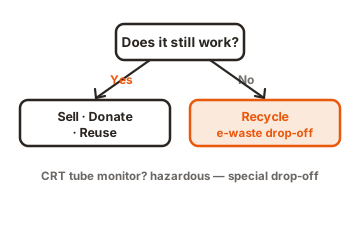
An old monitor gives you five real choices: sell it, donate it, trade it in, repurpose it, or recycle it. Which one fits comes down to a single question. Does the screen still work? If it powers on and shows a clean picture, it has value, so selling, donating, or reusing it makes sense. If it is dead, cracked, or an old tube monitor, the goal shifts to getting rid of it safely. Here is how to pick the right path and do it without much fuss.
Should you throw an old monitor in the trash?
No. Skip the trash can. Monitors hold small amounts of toxic metals like lead and mercury, and many states ban them from regular landfills for that reason. Tossing one is often against local rules, and it wastes parts that can be recovered and reused. A flat panel is mostly glass, plastic, aluminum, and circuit boards, all of which a recycler can pull apart and put back into the supply chain.
The good news is that getting rid of one properly is easy once you know your options. Most take only a short trip or a few minutes online.
Five things you can do with an old monitor
Here are your options at a glance, sorted by what shape the monitor is in. Pick the row that matches your screen, then jump to that section below for the steps.
| Option | Best for | What you get | Watch out for |
|---|---|---|---|
| Sell it | Working, newer flat panels | Cash back, often $30 to $150 | Takes time and effort to list |
| Donate it | Working monitors you don't need | Helps a school or charity, possible tax receipt | They must actually want it |
| Trade in / take back | Any brand, quick drop-off | Store credit or free recycling | Small fee on some monitors |
| Repurpose it | Spare or slightly flawed screens | A second display or DIY project | Needs a bit of tinkering |
| Recycle it | Broken, old, or CRT monitors | Safe disposal of toxic parts | Rarely curbside; find a drop-off |
1. Sell it for cash
If your monitor still works and is reasonably modern, sell it. A used 24-inch 1080p display often brings in $30 to $60, and larger or higher-resolution screens can fetch well over $100. Gaming monitors with fast refresh rates hold their value best.
List it on a local marketplace so you can hand it over in person and skip shipping, which is a pain with something this bulky. Clean the screen, take a few clear photos showing it powered on, and note the size, resolution, and ports. Price it against similar local listings and be ready to meet in a public spot.
2. Donate it to someone who needs it
A working monitor you do not want can go straight to someone who does. Schools, libraries, community centers, and charities often take used displays, and refurbishing groups fix them up for families, students, and nonprofits that cannot afford new gear.
Thrift stores like Goodwill accept them at many locations, though it is worth a quick call first since policies vary by branch. If you want the reuse to count for a tax deduction, ask for a receipt at drop-off. One rule holds everywhere: only donate a monitor that actually works. A broken screen is a cost to the charity, not a gift, so a dead one belongs at a recycler instead.
3. Trade it in or use a store take-back program
Big retailers make drop-off simple, and they take any brand no matter where you bought it. This is the easy button when you just want the thing gone today.
Best Buy accepts monitors up to 50 inches at its stores, with a limit of three items per household per day, and its in-store recycling program also covers older tube monitors up to 31 inches. Some monitors carry a small fee depending on your state.
Staples runs a free electronics recycling program and takes up to seven items per visit, though flat-panel monitors carry a $29.99 charge in many states (it is waived in several, including California, New York, and Illinois). Staples Rewards members earn a small credit each time they recycle in store. Either way, call ahead to confirm the current fee and item limits at your local shop.
It is also worth checking the maker of your monitor. Many manufacturers run take-back programs and will recycle their own hardware, sometimes with a prepaid shipping label.
4. Give it a second life at home
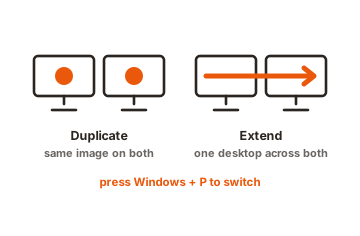
A spare monitor is useful even if it is not your main screen anymore. The simplest move is to add it as a second display. Plugging in another monitor gives you room to keep email open on one side and your work on the other, and almost any desktop or laptop can drive a second screen through HDMI or DisplayPort.
If you would rather build something, an old panel can become a wall-mounted dashboard for your calendar and the weather, a dedicated screen for a security camera feed, or a digital photo frame. Screens with a damaged panel but a working backlight even get turned into tracing light boxes or soft fill lights for photos. These projects take some tinkering, but they keep a working screen out of the waste stream a while longer.
5. Recycle it the right way
When a monitor is broken, ancient, or nobody wants it, recycling is the responsible end of the line. The key is to use a proper electronics recycler, not the curbside bin, since monitors usually cannot go in with household recycling.
Look for a certified recycler, which means one audited to a recognized standard so you know the parts are handled safely and the material is not just dumped overseas. The two main certifications to look for are R2 and e-Stewards.
To find a drop-off near you, the EPA keeps a plain-language guide to donating and recycling electronics with links to locate certified programs in your area. Many cities also run household hazardous waste days and permanent e-waste collection sites that take monitors for free or a small fee.
Wipe your data first, if your monitor is smart or all-in-one
A plain monitor stores nothing, so there is no data to worry about. But some machines blur the line. An all-in-one, where the computer lives inside the display, has a hard drive full of your files. Some newer smart monitors run apps and remember your account logins too.
If that is what you have, clear it before it leaves your hands. Sign out of every account, then run a factory reset. For an all-in-one with a hard drive, a factory reset is the floor, not the ceiling, so wiping the drive with erase software gives you real peace of mind before you sell, donate, or recycle it.
What makes CRT monitors different
Old tube monitors, the deep, heavy boxes from the 1990s and early 2000s, need extra care. Each color CRT holds an average of about four pounds of lead sealed in its glass, which is why they are regulated as hazardous waste when thrown out. That weight and that lead are the whole reason you cannot treat one like a flat panel.
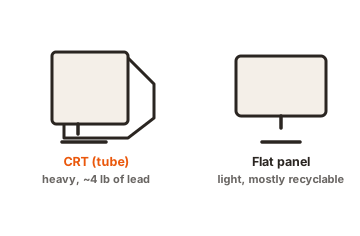
Never put a CRT in the trash, and never break the glass. Take it to an e-waste recycler or a hazardous waste collection site that specifically accepts tube monitors, and call first, because not every recycler still handles them. One upside: working CRTs are prized by retro gamers, and certain models sell for real money, so a quick search on the make before you recycle can be worth it.
Conclusion
Getting rid of an old monitor comes down to one question: does it still work? If it does, sell it, donate it to a school or charity, or press it into service as a second screen so it keeps earning its keep. If it is broken or a heavy old tube monitor, take it to a certified e-waste recycler or a hazardous waste drop-off rather than the trash. Wipe the data first if there is a computer inside. A good result is a monitor that is reused or safely recycled, and nothing toxic left in a landfill.
For more ways to put a spare screen to work, see our monitor mounting guides.
Frequently asked questions
Can I put an old computer monitor in the recycling bin?
No. Curbside bins do not take monitors. They need a dedicated electronics recycler, a retailer take-back program, or a household hazardous waste site. Check the EPA's electronics recycling guide to find a certified drop-off near you.
How much is an old monitor worth?
A working 24-inch 1080p monitor usually sells for about $30 to $60, and larger or higher-resolution screens often top $100. Fast gaming monitors hold value best. Broken monitors have little resale value and are better recycled.
Where can I recycle a monitor for free?
Staples recycles monitors free in several states, and many cities hold free e-waste collection days. Best Buy and Staples both charge a small fee for monitors in some states, so call your local store to confirm before you go.
Do I need to erase anything on a regular monitor?
A standard monitor stores no data, so there is nothing to erase. Only worry if you have an all-in-one with a built-in computer or a smart monitor with apps. In that case, sign out of accounts and factory reset it first.
Why can't I throw away an old CRT monitor?
Each color CRT contains about four pounds of lead in its glass, which makes it hazardous waste. Most states ban CRTs from landfills. Take yours to an e-waste recycler or hazardous waste site that accepts tube monitors, and never smash the glass.