Is 165Hz Monitor Good for Gaming? A Straight Answer
Table of contents
Yes, a 165Hz monitor is good for gaming. It refreshes the screen 165 times a second instead of the 60 you get on a standard display, so motion looks smoother, fast action stays clearer, and your inputs feel a touch quicker. For most people, from casual players to serious competitors, it lands at a smart spot: nearly all the benefit of high-refresh gaming, without the price jump that faster screens demand.
The catch is that the monitor is only half the story. To feel the upgrade, your PC has to push frame rates up near that 165 mark in the games you play. Below is what 165Hz actually gives you, how it stacks up against 144Hz and 240Hz, the hardware you need, and the specs that matter more than the headline number.
What a 165Hz refresh rate actually means
Refresh rate is how many times a screen redraws the image every second, measured in hertz (Hz). A 60Hz monitor shows 60 fresh images per second. A 165Hz monitor shows up to 165. More redraws mean each moment of motion is broken into smaller, smoother steps, so movement looks fluid instead of choppy.
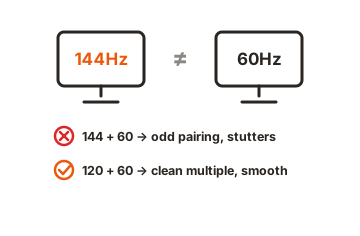
There’s a limit, though. A monitor can’t invent frames. It can only display the ones your graphics card sends it. If your PC produces 90 frames per second (fps), a 165Hz screen shows 90, not 165. The refresh rate is the ceiling, and your frame rate is what you actually get up to that ceiling.
Is 165Hz good for gaming, and who is it for?
For gaming, 165Hz is an easy recommendation. The jump from 60Hz to 165Hz is the kind you feel the moment you move the camera. Aiming feels more connected, scrolling text is readable while it moves, and fast enemies stay sharp instead of smearing across the screen. It helps most in fast games like shooters, racers, and fighting games, where every frame carries information you act on.
It suits a wide range of players:
- Competitive players get lower input lag and clearer motion, which makes tracking and flick shots easier.
- Everyday and mixed gamers get a smoother desktop, smoother scrolling, and a better feel in every game, even slower ones.
- Value shoppers get most of the high-refresh benefit at a price close to older 144Hz screens.
Where the payoff shrinks is with slow, cinematic single-player games played for looks rather than reaction time. If you mostly play story-driven games and care about detail, spending on resolution and panel quality often beats chasing refresh rate. Even then, a 165Hz screen won’t hurt; the extra smoothness is just less central to the experience.
One reassuring point: you don’t have to hit a locked 165fps to benefit. Running 100 to 120fps on a 165Hz panel with adaptive sync turned on already feels far smoother and cleaner than a locked 60Hz display.
165Hz vs 144Hz: is there a real difference?
On paper, 165Hz beats 144Hz by 21 frames per second, roughly a 13% bump. In practice, that gap is tiny. The time between frames drops from about 6.94 milliseconds at 144Hz to about 6.06 milliseconds at 165Hz, a change of under one millisecond. In a blind test, most people can’t tell the two apart.
| Spec | 144Hz | 165Hz |
|---|---|---|
| Frames per second | 144 | 165 |
| Time between frames | ~6.94 ms | ~6.06 ms |
| Upgrade from 60Hz | Big, obvious | Big, obvious |
| 144Hz vs 165Hz gap | Baseline | Very small |
Here’s the part that settles the debate: the two categories have effectively merged. Many panels sold as 144Hz now run natively at 165Hz or 180Hz, because manufacturers found they could tune existing 144Hz panels to 165Hz without new technology. That means you often get the extra frames for the same money. So if a 165Hz model costs about the same as a 144Hz one, take it, but don’t pay a big premium for those few extra frames alone.
165Hz vs 240Hz: should you spend more?
This is the more interesting comparison. A 240Hz monitor updates every 4.17 milliseconds versus 6.06 milliseconds at 165Hz, so it can show newly rendered frames sooner. The difference is real, but it’s smaller than the leap from 60Hz to 165Hz, and it’s harder to see.
Two things decide whether 240Hz is worth it for you. First, your games have to run near 240fps for the panel to stretch its legs; if a game caps out around 120fps, most of that refresh headroom sits unused. Second, the benefit shows up most in fast competitive titles, where a serious player can feel cleaner flicks and camera pans even when the frame counter looks fine.
A useful pattern: once you get used to 240Hz, dropping back to 165Hz becomes noticeable, even though jumping up felt subtle at first. So the upgrade is genuine, just subject to real diminishing returns. For most players, a strong 165Hz to 180Hz monitor is the better buy, and you save the 240Hz money for competitive shooters where the PC can actually sustain those frame rates.
What hardware do you need to feed a 165Hz monitor?
A 165Hz monitor is only as good as the frame rate your PC can produce. Your graphics card (GPU) is the main driver, and what you need depends heavily on resolution. Higher resolutions ask far more of the GPU, so the same card that flies at 1080p can struggle at 1440p.
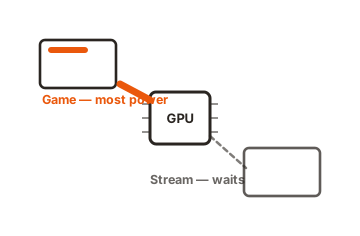
A quick way to sanity-check your rig: look up the frame rates your GPU hits in the games you actually play, at the resolution and settings you use. If your card comfortably clears 100fps in those games, a 165Hz monitor makes sense. If it barely reaches 60fps, fix the GPU first, or the monitor’s extra speed will mostly go to waste.
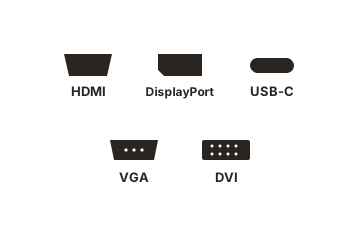
Don’t forget the connection. Use a DisplayPort cable where you can, since many monitors only reach their full 165Hz over DisplayPort while their HDMI ports top out lower. After plugging in, set the rate in Windows under Display settings; a fresh monitor often defaults to 60Hz until you switch it to 165 manually.
The specs that matter more than the Hz number
Refresh rate grabs the headline, but a few other specs decide whether a 165Hz monitor actually looks and feels great. It’s easy to buy purely on the Hz figure and end up with a screen that smears in fast scenes. These are the ones to weigh.
Response time and ghosting
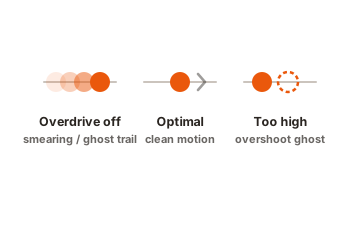
Response time is how fast a pixel changes from one color to the next, measured in milliseconds. To keep up cleanly at 165Hz, pixels need to switch in under about 6.06 milliseconds. If they’re slower, fast-moving objects leave a faint trail behind them, called ghosting or smearing. A monitor can hit 165Hz on the box and still smear if its pixels can’t switch quickly enough, so check reviews for real-world motion tests, not just the advertised number.
Panel type
The panel technology shapes color, contrast, and speed. There are three common types, and each trades something:
- IPS gives the best color and viewing angles, with response times now fast enough for most gaming. It’s the safe all-round pick.
- VA delivers the deepest contrast and darkest blacks, but can smear more in fast, dark scenes.
- TN is the cheapest and quickest, but has weaker colors and viewing angles, and it’s fading from the market.
Variable refresh rate (VRR)
Variable refresh rate lets the monitor sync its refresh to your GPU’s changing frame rate, which kills screen tearing (that ugly split-image effect) and stutter. Look for AMD FreeSync or NVIDIA G-Sync support. It’s what makes running 100 to 120fps on a 165Hz panel feel smooth instead of uneven, and most good 165Hz monitors include it. Treat it as a must-have, not a bonus.
Which resolution should you pair with 165Hz?
The right resolution depends on your GPU and what you play. Refresh rate and resolution pull against each other: the higher the resolution, the harder it is to keep frame rates near 165.
| Resolution | To push high frames at 165Hz | Good for |
|---|---|---|
| 1080p (Full HD) | Mid-range card like an RTX 4060 or RX 7600 | Competitive shooters, easy 100+ fps |
| 1440p (QHD) | RTX 4070-class or better for high settings | The popular all-round 165Hz sweet spot |
| 4K (UHD) | High-end GPU, and even then 165fps is hard | Cinematic games; 144Hz is more realistic |
- 1080p at 165Hz is the competitive-gaming pick. Frames are easy to hit even on mid-range cards, and the sharp pixel density on a 24-inch screen keeps everything crisp.
- 1440p at 165Hz is the popular all-round choice. It looks noticeably sharper than 1080p while staying reachable for a solid mid-to-high GPU, which is why it’s the most common 165Hz resolution.
- 4K at 165Hz is demanding. Even top GPUs rarely sustain 165fps at 4K, so most players are better served by a 4K 144Hz panel for cinematic games or by staying at 1440p for high frames.
If you play mostly fast, competitive games, lean toward 1080p or 1440p so your PC can feed the panel. If you want a sharper, more detailed picture and play a mix of titles, 1440p at 165Hz is the balance most people are happiest with.
Conclusion
A 165Hz monitor is a strong choice for gaming. It delivers clearly smoother, sharper motion and snappier input than 60Hz, and it hits a smart price point for nearly everyone. To feel it, pair it with a GPU that can push high frame rates at your resolution, turn on variable refresh, and check response time and panel quality, not just the Hz number. Do that, and a good result looks like fluid, tear-free gameplay that stays crisp even when the action gets fast.
For more on picking the right screen, browse our monitor buying guides.
Frequently asked questions
Is 165Hz overkill for casual gaming?
No. Even casual and slower games feel smoother at 165Hz, and the desktop and scrolling improve too. You don't need to hit 165fps to benefit; 100 to 120fps with variable refresh already feels much better than 60Hz.
Can my eyes even see 165Hz?
Yes. Most people clearly notice the jump from 60Hz to 165Hz in motion and responsiveness. The gap you can't easily see is between very close rates, like 144Hz and 165Hz, where the difference is under one millisecond per frame.
Do I need a strong graphics card for a 165Hz monitor?
It depends on resolution. At 1080p, a mid-range card like an RTX 4060 or RX 7600 is plenty. At 1440p, plan on an RTX 4070-class GPU or better to push high frames on demanding games.
Is 165Hz good enough, or should I get 240Hz?
For most players, 165Hz is enough. Move to 240Hz only if you play fast competitive games and your PC can sustain frame rates near 240. The upgrade is real but smaller than the leap from 60Hz.
Why does my new 165Hz monitor feel like 60Hz?
It's likely still set to 60Hz. New monitors often default there. Set the refresh rate to 165Hz in your display settings, and use a DisplayPort cable, since some HDMI ports cap the rate lower.