4K vs 1080p Computer Monitor: Which One You Actually Need
Table of contents
Neither resolution is better on its own, because resolution only means something once you pair it with a screen size. 1080p is comfortable up to about 24 inches and falls apart beyond that. 4K makes sense from 27 inches upward, and what it mostly buys you is sharpness rather than extra desktop space. The second half of the decision is your graphics card, since 4K is exactly four times the pixels of 1080p. Work through those two questions and the answer picks itself.
The number that decides it is pixel density
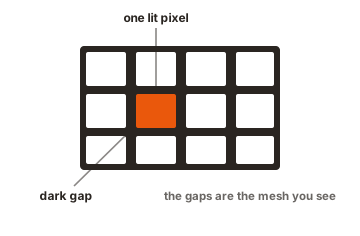
Pixel density, measured in pixels per inch, is what your eyes actually respond to. Same resolution on a bigger panel means bigger pixels and softer text.
| Screen | Pixel density |
|---|---|
| 24 inch 1080p | 92 PPI |
| 27 inch 1080p | 82 PPI |
| 27 inch 1440p | 109 PPI |
| 32 inch 4K | 138 PPI |
| 27 inch 4K | 163 PPI |
| 24 inch 4K | 184 PPI |
The two numbers worth staring at are 92 and 82. A 24 inch 1080p panel is the ordinary office standard and looks fine. Stretch the same 1080p across 27 inches and density drops by a tenth, which is the point where most people start describing text as chunky.
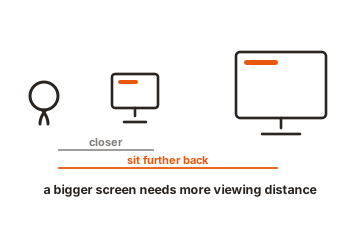
Viewing distance is the other half of it. OSHA’s workstation guidance puts the screen at least 20 inches away, and at that range the difference between 82 and 163 PPI is not subtle. Sit further back, as you would from a TV, and the gap shrinks to nothing.
4K usually does not give you more desktop space
This is the part that surprises people, and it changes the whole calculation.
At 27 inches, running 4K at 100 percent scaling makes menus and text too small for most eyes. The standard setting is 150 percent, and 3840 divided by 1.5 is 2560. Your effective workspace becomes 2560 by 1440, which is exactly what a 1440p monitor gives you. Everything is rendered with four times the pixels, so it is noticeably sharper, but you fit the same number of windows on screen.
At 32 inches, 125 percent scaling is common, which leaves a larger effective workspace of roughly 3072 by 1728. That is where 4K starts delivering both sharpness and room.
There is a minority who do want the space rather than the sharpness, and 4K delivers it if you can read small type. Run a 32 inch 4K panel at 100 percent and you get a 3840 by 2160 desktop, which holds four full 1080p windows at once. Video editors with long timelines, traders with dense dashboards and developers who like three files side by side genuinely use it that way. Most people cannot, and that is fine.
Scaling has a side effect worth knowing about. Modern applications redraw themselves cleanly at any percentage, but older desktop software written before high density screens can look soft at fractional settings like 125 or 150 percent. Windows can compensate per application, though the result varies.
The graphics card cost
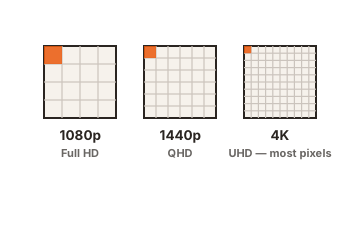
1080p is 2.07 million pixels. 4K is 8.29 million. That is four times the work, and in games where the graphics card is the limiting factor, frame rates fall roughly in proportion.
Upscaling changes the arithmetic more than any other single factor. Rendering at a lower internal resolution and reconstructing to 4K recovers much of the loss, and on current cards the result holds up well in single player games. It is less popular in competitive titles, where players prefer native rendering and very high frame rates.
The budget angle matters too. At any given price, 1080p buys you a higher refresh rate and 4K buys you detail. A 24 inch 1080p panel at 240Hz and a 27 inch 4K panel at 60Hz often cost about the same, and they suit completely different people.
What most people are actually running
Valve’s Steam Hardware Survey is the largest public sample of real gaming PCs, and in the April 2026 results 1920 by 1080 remained the most common primary display at 52.21 percent. 2560 by 1440 sat at 21.41 percent and rising, while 3840 by 2160 reached 5.09 percent.
That is not an argument for buying 1080p. It is context for two things: games are still optimised around 1080p and 1440p, so you are never fighting the market by choosing them, and 4K remains enthusiast territory largely because of what it costs in graphics hardware rather than in monitor price.
What about the content itself
Resolution helps most where the source has detail to show. Text and interface elements are rendered fresh by your computer at whatever density the screen offers, so they improve immediately. Modern games render at native resolution too, so they gain as well.
Older material does not. A photo from a phone camera, a 1080p video, or a game from a decade ago has a fixed amount of detail, and a 4K panel simply displays it larger and smoother rather than sharper. Streaming services do carry 4K tiers, though a monitor at desk distance is not where most people notice that.
This is why the strongest case for 4K is desk work rather than entertainment. The thing you look at all day, which is text, is exactly the thing that benefits most.
Where each one wins
1080p is the right choice for competitive shooters where frame rate beats fidelity, for 24 inch screens, for older or laptop graphics, and for anyone on a tight budget who wants a high refresh rate rather than more pixels. It is a performance-first decision, not an outdated one.
4K is the right choice at 27 inches and above for text, code and spreadsheets, where the sharpness is visible all day rather than only in games. It suits photo and video work, where a 4K timeline maps to the panel one pixel to one pixel, and it suits single player games with upscaling switched on. It also makes a large screen usable at desk distance, which 1080p cannot do past 24 inches.
1440p is the answer neither option gives you. At 27 inches it lands at 109 PPI, needs far less graphics horsepower than 4K, and is where most high refresh panels now sit. If your shortlist has 1080p and 4K on it, add a 27 inch 1440p model before deciding.
What you need to drive it
4K at 60Hz needs HDMI 2.0 or DisplayPort 1.2 as a minimum, which any graphics card from the last decade provides. 4K at 120Hz or more needs HDMI 2.1, or DisplayPort 1.4 with Display Stream Compression, plus a cable rated for it.
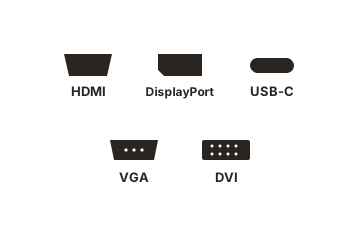
Check your laptop before buying, because output limits vary. A machine that drives 4K at 60Hz over USB-C may not manage 4K at 144Hz. And if the monitor will spend its life on a shallow desk where you sit close, factor that into the size before the resolution.
Conclusion
Pick the size first, then the resolution that suits it. Up to 24 inches, 1080p is fine and buys you refresh rate. At 27 inches, 1080p is too coarse, and the real contest is between 1440p and 4K, with 4K winning on sharpness and 1440p on price and frame rate. At 32 inches and beyond, 4K is the only sensible option. And remember that 4K on a 27 inch screen gives you a 1440p-sized desktop that simply looks better, which is worth paying for if you read all day and not if you mostly play.
For more, see our monitor buying guides.
Frequently asked questions
Is 4K worth it on a 27 inch monitor?
For text-heavy work, yes, because 163 PPI renders type noticeably more cleanly than 109. For gaming alone it is a harder sell, since you get a 1440p-sized workspace while paying the full 4K performance cost.
Can you tell the difference between 1080p and 4K?
At desk distance, easily. The comparison people find hard is 1440p against 4K, which is subtle in games and obvious in small text.
Is 1080p still good in 2026?
Yes, on a 24 inch screen. It is still the most common primary resolution among Steam users, it costs less, and it lets a modest graphics card hold very high frame rates.
Do I need a strong GPU for a 4K monitor?
For desktop work, no. Any modern card drives 4K at 60Hz without effort. For gaming at high settings you need a capable card, or upscaling, or a willingness to lower settings.
Does 4K make text sharper or just smaller?
Sharper, once you set scaling correctly. At 100 percent everything is smaller. At the recommended 150 percent on a 27 inch panel, items are the same size as on a 1440p screen and rendered with far more detail.