How Is Monitor Size Measured?
Table of contents
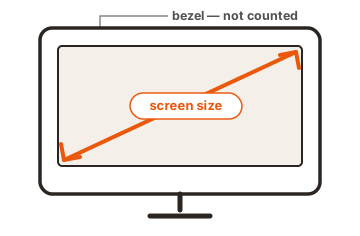
Monitor size is the diagonal distance across the screen, measured from one corner to the opposite corner in inches. A 27-inch monitor has a viewable area that runs 27 inches corner to corner. The plastic frame around the screen, called the bezel, is never included. So the number on the box tells you the length of that diagonal line and nothing else about the shape.
That measurement is the standard for every flat screen you can buy, from a laptop to a television. Below is what the number covers, how to check it yourself, and the part it leaves out.
What does monitor size actually measure?
The size measures the screen’s viewable area on the diagonal. Picture a straight line from the bottom-left corner of the lit-up screen to the top-right corner. The length of that line, in inches, is the monitor size. Nothing outside the glowing part counts.
Two things get left out on purpose. The bezel is excluded, so a chunky old monitor and a modern edge-to-edge one can share the same 24-inch label. The body of the monitor, including its depth and stand, is also separate. When a spec sheet lists physical dimensions, those describe the whole unit for fitting on a desk, while the size in inches always means just the diagonal of the picture.
Why are screens measured on the diagonal?
The diagonal is used because it sums up a rectangle in one clean number. A screen has a width and a height, but quoting both is clumsy, and the diagonal captures the overall reach of the display in a single figure that is easy to compare and print on a box.
The habit goes back to early televisions, which used round picture tubes. The rectangular image inside was described by its diagonal, and the convention stuck as screens turned flat. One difference is worth knowing: on old tube sets the labeled size often ran a little larger than the visible picture, since part of the tube hid behind the casing. Flat panels use the true diagonal of the visible screen, so the size you are quoted is the size you actually see.
You can read the full history on Wikipedia’s display size page, which also lists the width and height for dozens of common diagonals.
How to measure your monitor in 3 steps
You can check any monitor with a tape measure or a ruler in under a minute. Measure the screen only, keep the tape straight, and read the result in inches.
-
Find the corners of the screen
Look at the actual display area, not the outer frame. Start at one bottom corner of the lit screen. -
Measure corner to corner
Stretch the tape diagonally to the opposite top corner, for example bottom-left up to top-right. Keep it flat against the glass and pulled straight, not sagging or angled. -
Read the inches
The number where the tape meets the far corner is your monitor size. A reading of 23.8 is sold as a 24-inch class; makers round slightly, and a listed size sits within about half an inch of the true measurement.
What the diagonal number leaves out
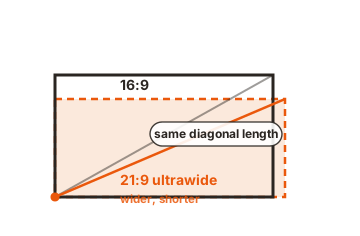
The diagonal alone does not tell you how wide or how tall a screen is, and that depends entirely on its shape, or aspect ratio. Aspect ratio is the relationship between width and height, written as two numbers like 16:9 or 21:9. The same diagonal on two different shapes gives you two different rectangles.
Here is the catch that trips people up. A 34-inch ultrawide at 21:9 and a 34-inch standard screen at 16:9 share a diagonal, but the ultrawide is wider and shorter, and the two do not even have the same total area. Wider shapes spread that diagonal into more width and less height. So a bigger inch number does not always mean more usable space, and two screens of the same size can fit a desk very differently.
If you want the real width and height behind a diagonal, it comes from simple geometry. For the common 16:9 shape, width is about the diagonal times 0.872 and height is about the diagonal times 0.490. That makes a 27-inch 16:9 monitor roughly 23.5 inches wide and 13.2 inches tall. A quick tool like the Omni Calculator screen size tool will do the math for any size and shape if you would rather not reach for a calculator.
These are the width and height behind some everyday sizes:
| Diagonal | Width | Height | Ratio | Common use |
|---|---|---|---|---|
| 24 in | 20.9 in | 11.8 in | 16:9 | Everyday desktop, office work |
| 27 in | 23.5 in | 13.2 in | 16:9 | Gaming, design, dual setups |
| 32 in | 27.9 in | 15.7 in | 16:9 | Content creation, 4K viewing |
| 34 in | 31.4 in | 13.5 in | 21:9 | Ultrawide, video and multitasking |
Screen size is not the same as resolution
Size and resolution are two separate things, and mixing them up leads to bad buys. Size is the physical diagonal in inches. Resolution is the number of pixels the screen packs in, written as something like 1920 x 1080. One is about how big the screen is; the other is about how much detail it can show.
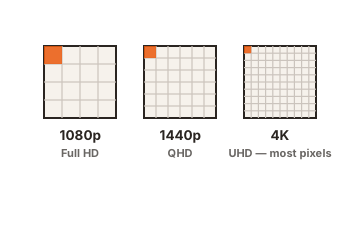
A large screen can have low resolution, and a small screen a very high one. A 32-inch and a 24-inch monitor can both run at 1920 x 1080, but the pixels are stretched larger on the 32-inch, so the image can look softer up close. What sharpens a picture is pixel density, meaning how many pixels sit in each inch. That is why a phone can look crisper than a much larger monitor. Treat size and resolution as two boxes to tick, not one.
How to find your monitor size without measuring
If you cannot reach the screen or lost the tape, the size is recorded in a few easy places. The fastest is the model number on a sticker on the back of the monitor; searching that model online returns the exact size and full specs.
Software helps too, with a caveat. On Windows, right-click the desktop, open Display settings, then Advanced display. On a Mac, open the Apple menu, choose About This Mac, then Displays. These reliably show resolution but do not always print the physical inches, so the model-number lookup is the surest route when you need the size itself.
Conclusion
Monitor size is just the diagonal of the viewable screen in inches, frame not counted, and you can confirm it in a minute with a tape measure from one corner to the other. Remember that the diagonal alone hides the shape: check the aspect ratio to know the real width and height, and treat resolution as a separate spec. Match the size to your desk and the resolution to your eyes, and you have picked the right screen.
For more on reading a spec sheet before you buy, see our monitor specs guides.
Frequently asked questions
Do I include the bezel when measuring a monitor?
No. Measure only the lit display area, corner to corner. The bezel, the frame around the screen, is never part of the size, and including it makes the monitor sound larger than it really is.
Is a 27-inch monitor actually 27 inches wide?
No. The 27 inches is the diagonal, not the width. A 27-inch 16:9 monitor is about 23.5 inches wide and 13.2 inches tall. The diagonal is always longer than either side.
Why do two monitors of the same size look different?
Because their aspect ratios differ. Two screens can share a diagonal yet have different widths, heights, and total area. An ultrawide at 21:9 is wider and shorter than a standard 16:9 screen of the same size.
How do I measure a laptop screen?
The same way: measure the display diagonally, corner to corner, skipping the bezel. Laptops often have thin frames, so verify against the model number, since the printed spec is the most reliable source.
Is screen size the same as resolution?
No. Size is the physical diagonal in inches; resolution is the pixel count, like 1920 x 1080. A large screen can have low resolution and a small one high resolution, so check both separately when buying.