What Size Monitor Do Pros Use? The 24.5-Inch Standard
Table of contents
The 24.5-inch standard, and the reasons behind it.
Nearly every professional esports player uses a 24.5-inch monitor at 1080p resolution. Not 27 inches, not a curved ultrawide, and not 4K. The screen is small, sharp, and fast, and it runs at a very high refresh rate of 240Hz or 360Hz. If you watch a top Counter-Strike, Valorant, or Apex Legends match, you are looking at rows of the same compact panel on every desk. Here is why that size wins, and what it means for the screen you should buy.
The exact spec pros run
The professional standard is a 24.5-inch, 16:9, 1080p monitor with a 240Hz or 360Hz refresh rate. This is remarkably consistent across games and regions. Pulling from a database of more than 2,300 tracked pro players, the five most-used monitors are all the same 24.5-inch 1080p size, separated only by refresh rate and small feature differences.
| Monitor | Size | Resolution | Refresh rate |
|---|---|---|---|
| ZOWIE XL2566K | 24.5 in | 1080p | 360 Hz |
| ZOWIE XL2546K | 24.5 in | 1080p | 240 Hz |
| ZOWIE XL2566X+ | 24.5 in | 1080p | 360 Hz |
| ZOWIE XL2546 | 24.5 in | 1080p | 240 Hz |
| Alienware AW2518H | 24.5 in | 1080p | 240 Hz |
A few things jump out. The size never changes. The resolution never changes. The brand barely changes, since the ZOWIE XL line dominates the top of the list. The only real variable is refresh rate, where players pick either 240Hz or the faster 360Hz depending on what their PC can push. This is not a loose trend with lots of exceptions. It is close to a hard standard, and it holds because of a handful of concrete reasons rather than habit.
It is worth being precise about that size, because the numbers get used loosely. People say “24-inch,” but the panels pros actually run measure 24.5 inches on the diagonal. That half inch is not an accident. It is the size manufacturers settled on for competitive displays, and the whole category, from ZOWIE to Alienware to newer entrants, clusters right around it. When you shop, the listing might say 24.5 inches or round it to 25, and either one lands you in the same competitive class.
The reason one brand shows up again and again is features built for this exact job. The popular ZOWIE panels include a physical dial called the S-Switch for saving and swapping display profiles instantly, plus a motion-sharpening technology called DyAc that reduces the blur you see during fast movement, so sprays and flicks look clearer. Small extras like markings on the stand let a player set the screen to the same position at every event. None of that changes the size or resolution, but it explains why the pack keeps landing on the same handful of models.
Why 24.5 inches and not something bigger
A smaller screen keeps the whole playing field inside your central vision, so your eyes barely have to move. Your sharp, detailed vision only covers a small cone in the middle of what you see, roughly the area of a sticky note held at arm’s length. Everything outside that cone is blurry and mostly good for catching motion. On a 24.5-inch screen at a normal viewing distance, the important parts of the game, your crosshair, nearby enemies, your health, all sit inside or close to that sharp central cone.
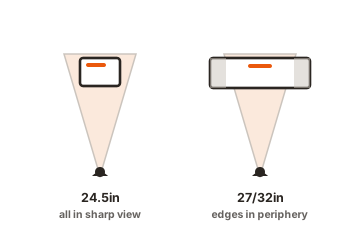
Push up to a 27-inch or 32-inch screen at the same distance and the edges of the image drift out toward your blurry peripheral vision. Now you have to flick your eyes, or even turn your head, to check a corner or read your minimap. That eye travel is small, but it repeats thousands of times a match and adds a little delay to every check. In a game decided by tens of milliseconds, players cut that delay by keeping the screen compact. One controlled test measured the effect directly: moving to a bigger display increased eye travel by roughly 12 percent, which can slow how fast you lock onto a target in games built around quick flicks.
The goal is to see everything at once without moving. A 24.5-inch screen fits the game into the part of your vision that is actually sharp.
There is also a practical tournament reason. At official events, players are not allowed to bring their own screens, because a richer player or team could otherwise show up with better hardware and gain an edge. Everyone plays on the same monitor the organizer provides, and for years that has been a 24.5-inch 1080p high-refresh panel. So pros practice on the exact size they will compete on. Training on a 32-inch 4K screen would be pointless if the trophy is decided on a 24.5-inch one.
Why 1080p instead of 1440p or 4K
Pros pick 1080p because frame rate matters far more than fine detail, and lower resolution is the easiest way to keep frames high and steady. A monitor’s refresh rate only helps if the PC can actually feed it that many frames. Running 1080p asks much less of the graphics card than 1440p or 4K, which makes it far easier to hold 240 or 360 frames per second without a single dip. A stutter at the wrong moment can cost a round, so a rock-steady frame rate beats a prettier picture every time.
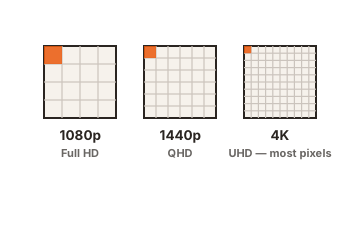
There is a nice bonus hiding in the size and resolution pairing. Squeezing 1080p onto a small 24.5-inch panel gives a pixel density of about 92 pixels per inch. Spread that same 1080p across a 27-inch screen and density drops to around 82 pixels per inch, so the image looks softer and small distant targets get a little fuzzy. The compact screen is not a compromise on sharpness. At 1080p, a 24.5-inch panel is actually crisper than a 27-inch one.
Where refresh rate fits in
Size and resolution set the stage, but refresh rate is the reason pros obsess over their screens, and it ties straight back to the 1080p choice. Refresh rate is how many times per second the monitor draws a fresh image. A 60Hz screen redraws 60 times a second, which sounds fine until you do the math. Each frame sits on screen for about 16.7 milliseconds, and during that window nothing new appears. If an enemy steps out just after a frame is drawn, you wait most of that window before you even see them.
Crank the screen to 240Hz and each frame lasts about 4.2 milliseconds. At 360Hz it drops to roughly 2.8 milliseconds. New information reaches your eyes sooner, so you react sooner. That shaved time is the entire point, and it is why pros chase high refresh rates harder than any other spec. It also loops back to resolution: a 360Hz screen only helps if the PC actually produces 360 frames a second, and the surest way to hold those frames without a dip is to keep the resolution at 1080p. High refresh and low resolution are two halves of the same decision.
Refresh rate is about how quickly you see what just happened. Higher numbers shorten the gap between an enemy appearing and you reacting.
Does a bigger screen ever help?
Yes, but only in a narrow case, and only if you raise the resolution to match. Chip maker NVIDIA ran a careful study on this exact question, comparing a 24.5-inch 1080p screen against a 27-inch 1440p screen, both at 360Hz. The task was to click a set of very small targets as fast as possible, standing in for long-range headshots. Players on the larger, higher-resolution screen finished about 111 milliseconds faster on average, and the result was statistically solid. You can read the full NVIDIA study on display size and aiming for the numbers.
The catch is that the two changes go together. The 27-inch screen only helped because it also jumped to 1440p, which lifts pixel density to about 109 pixels per inch and makes tiny targets a touch clearer. A 27-inch screen still stuck at 1080p gets you the worst of both: a bigger canvas that pulls the action wider, plus a softer image. That combination is why 27-inch 1080p is generally a poor competitive choice. It only becomes interesting at 1440p, paired with a PC strong enough to keep the frames up, which is exactly the setup a few pros with elite hardware have started to explore.
Anything larger than that, a 32-inch screen, an ultrawide, or a curved display, is built for immersion rather than speed. Those are excellent for open-world adventures, racing, or working with several windows at once, but they spread the game too wide for twitchy competitive play and force more scanning. That is why you will not see them at a tournament.
What size should you buy?
Match the screen to how you actually play, not to what looks impressive in a photo. If you mainly play fast competitive shooters and want to mirror a pro setup, a 24.5-inch 1080p monitor at 240Hz or higher is the clear pick, and it is usually cheaper than the bigger options too. If you play a real mix of competitive and single-player games, a 27-inch 1440p screen at 165Hz or more is a sensible middle ground that stays sharp while giving you more room for everything else.
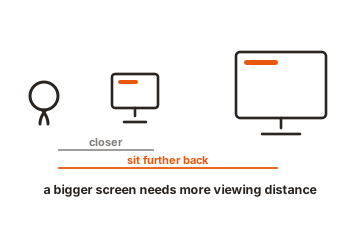
Two checks will save you from the most common regret. First, make sure your graphics card can actually hit high frame rates at whatever resolution you choose, since a fast screen is wasted if the PC cannot feed it. Second, measure your desk depth. A 24.5-inch screen sits comfortably about 20 to 28 inches from your eyes, and a bigger panel needs you to sit further back to avoid a wall of pixels and a sore neck. Get those two right and the size question mostly answers itself.
Desk depth trips people up more than they expect. Many popular gaming desks are about 24 inches deep, and a monitor stand can eat 6 to 8 inches of that space by pushing the screen forward. On a shallow desk that leaves you sitting closer than is comfortable, which is fine for a compact 24.5-inch panel but cramped for a 27-inch or larger one. If your desk is on the shallow side, that alone is a strong nudge toward the smaller screen, whatever games you play. If you have a deeper desk and room to sit back, the bigger options open up without strain.
One last point on chasing specs. The jump from 60Hz to 144Hz is enormous and everyone feels it. The step from 144Hz to 240Hz is smaller but still clear. Going from 240Hz to 360Hz is a fine refinement that mostly rewards players who already have flawless aim and a PC that never dips. So do not stretch your budget for the highest refresh number at the cost of a good panel and a resolution your PC can actually drive. A solid 24.5-inch 1080p screen at 240Hz gets a normal player almost everything the pros get.
- Mostly competitive shooters: 24.5-inch, 1080p, 240Hz or 360Hz.
- A mix of competitive and casual: 27-inch, 1440p, 165Hz or higher.
- Mostly immersive single-player, racing, or work: 32-inch or ultrawide, resolution to match.
Conclusion
Pros run a 24.5-inch 1080p monitor at 240Hz or 360Hz because it keeps the whole game inside sharp central vision, holds a rock-steady frame rate, and matches the screens used at tournaments. A bigger, higher-resolution display helps only in narrow cases and only when the PC can keep up. If you play fast shooters, copy the pros with a 24.5-inch 1080p high-refresh panel. If you play a broader mix, a 27-inch 1440p screen is the smarter all-rounder.
Still weighing your options? Browse all our monitor buying guides.
Frequently asked questions
Do pro gamers use 24 or 27 inch monitors?
Almost all use 24.5-inch monitors, which is the standard 24-inch class size. A small number with top-end PCs have started testing 27-inch 1440p screens, but 24.5 inches remains the competitive default across nearly every esport.
What resolution do professional gamers use?
1080p, on nearly every desk. It keeps frame rates high and steady, which matters far more than detail in competitive play. On a 24.5-inch screen, 1080p also looks sharper than the same resolution stretched across a 27-inch panel.
Why do pros use such small monitors?
A small screen keeps the whole game inside the sharp center of your vision, so your eyes barely move. Less eye travel means faster reactions. Tournaments also standardize on this size, so pros practice on what they compete on.
Is a 27-inch monitor bad for competitive gaming?
At 1080p, yes, since it looks softer and spreads the action wider. At 1440p it becomes a solid choice and can even improve aim on tiny targets, as long as your PC can drive high frame rates at that resolution.
What refresh rate do pro gamers use?
240Hz or 360Hz. Higher refresh rates show new frames sooner, which shortens the delay between something happening and you reacting. The main limit is your PC, since the screen only helps if it can feed that many frames per second.