16 Inch vs 32 Inch Monitor: Which One Do You Need?
Table of contents
Comparing a 16-inch monitor to a 32-inch one is not quite like comparing two shoe sizes. These are really two different tools built for different jobs. A 16-inch monitor is a small, light, often portable screen made for working on the move or adding a second display to a laptop. A 32-inch monitor is a large, stationary display built to give you an expansive, immersive desktop workspace. So the question is less “which is better” and more “do you want portability or screen space?” This guide breaks down exactly what separates them and helps you land on the right one.
The short answer: two different tools
If you only take one thing away, take this: a 16-inch monitor and a 32-inch monitor sit at opposite ends of the display world, and most people choosing between them are really choosing between two different ways of working.
The 16-inch size is the standard for portable monitors. These are thin, lightweight panels, often not much bigger than a tablet, that you can slip into a laptop bag and set up anywhere. They typically draw power over a single USB-C cable and act as a travel companion or a temporary second screen.
The 32-inch size sits at the large end of mainstream desktop monitors. It is a full-size display that lives permanently on a desk, gives you room for several windows at once, and is popular for immersive gaming, content creation, and heavy multitasking. It is not something you move around.
The size difference in real numbers
The diagonal numbers, 16 and 32, only tell part of the story, because screen area grows much faster than the diagonal. Doubling the diagonal does not double the screen; it roughly quadruples it.
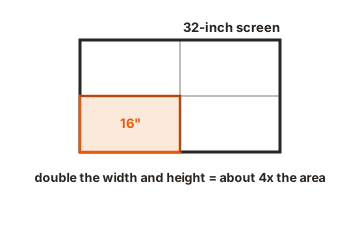
Here are the actual measurements for standard 16:9 panels at each size:
| Measurement | 16-inch (16:9) | 32-inch (16:9) |
|---|---|---|
| Width | about 13.9 inches | about 27.9 inches |
| Height | about 7.8 inches | about 15.7 inches |
| Screen area | about 109 sq inches | about 438 sq inches |
| Relative area | baseline | about 4x larger |
So a 32-inch monitor is twice as wide and twice as tall as a 16-inch one, which adds up to roughly four times the total screen area. That is the difference between a screen that holds one comfortable window and a screen that holds three or four side by side. When you picture these two next to each other, do not imagine one being a bit bigger; imagine one being four of the other.
What a 16-inch monitor is really for
The whole point of a 16-inch monitor is portability. It is designed to give you a second screen, or a screen at all, wherever you happen to be.
Strengths
- Truly portable. It is light and slim enough to carry in a laptop bag, making it ideal for travel, coffee shops, co-working spaces, or moving between rooms.
- Simple to connect. Many run on a single USB-C cable that carries both video and power, so there is little setup and often no separate adapter.
- A great laptop companion. Paired with a laptop, it instantly doubles your workspace, which is a big help for anyone who normally lives on one cramped screen.
- Affordable and low-power. Smaller panels generally cost less and sip power, which matters when you are running off a laptop battery.
Limits
- Limited screen space. At 16 inches you are realistically working with one main window at a time, not a sprawling multi-window layout.
- Often lower-end specs. Portable panels frequently prioritize size and weight over brightness, refresh rate, and color performance, though premium models exist.
- Not an immersive experience. For gaming or movies, a 16-inch screen feels small and personal rather than enveloping.
In short, a 16-inch monitor is the answer when your priority is having a screen with you, not having the biggest screen possible.
What a 32-inch monitor is really for
A 32-inch monitor is all about screen real estate and immersion. It is built to be the centerpiece of a desk, not a travel accessory.
Strengths
- Huge workspace. With around four times the area of a 16-inch panel, it comfortably fits multiple windows at once, cutting down how often you switch between them. It is roughly like having two 24-inch screens fused into one single display, without the gap in the middle.
- Immersive for gaming and media. The large screen fills more of your field of view, which makes games and movies far more engaging than a small panel can.
- Great for detailed work. Large spreadsheets, video timelines, design canvases, and code all benefit from the extra room, with less scrolling and more visible at a glance.
- Often higher-end specs. At this size you commonly find higher resolutions and better panels, since a big screen needs them to look sharp.
Limits
- Needs desk space. It is wide and benefits from a deeper desk so you can sit far enough back to take in the whole screen comfortably.
- Not portable. This is a fixed installation. It stays where you put it.
- Higher cost and power use. A large, high-resolution display costs more and uses more power than a small portable one, and it usually needs its own power outlet.
A 32-inch monitor is the answer when your priority is a large, comfortable, immersive workspace and you have a dedicated place to put it.
Head-to-head comparison
Here is how the two sizes stack up across the factors that matter most when deciding.
| Factor | 16-inch monitor | 32-inch monitor |
|---|---|---|
| Best for | Portability, travel, second laptop screen | Immersion, multitasking, desktop work |
| Screen area | Small (one main window) | Large (three or more windows) |
| Portability | Excellent, fits in a bag | None, stays on the desk |
| Setup | Often one USB-C cable | Needs power outlet and desk space |
| Typical use | On the go, tight spaces | Gaming, creating, office work |
| Cost | Lower | Higher |
| Power use | Low | Higher |
Does a bigger screen actually help you get more done?
It is a fair question, since the jump from 16 to 32 inches is large and large screens cost more. The short answer is that more screen space does help productivity, but mainly up to the point where you stop fighting for room to work.
Research on monitor size has generally found that moving from a very small display to a more generous one measurably improves how much people get done, largely because they spend less time switching between and rearranging windows. The benefit comes from being able to see related things at the same time: a document and its source, a spreadsheet and a chart, code and its output. A 16-inch screen forces a lot of that work into one window at a time, while a 32-inch screen lets several pieces live side by side.
There is a ceiling, though. Past a certain size the gains level off, and very large screens can introduce their own downsides, such as more head movement and a greater need for desk depth. That is why the right answer is not simply “as big as possible.” For a fixed desk where you multitask, a 32-inch screen lands in genuinely useful territory. For someone who mostly works in one window but needs to do it anywhere, a 16-inch screen removes the bigger obstacle, which is having no second screen at all. In both cases, the productivity win comes from matching the screen to how and where you work, not from the diagonal alone.
Resolution and sharpness on each size
Size and resolution work together to decide how sharp a screen looks, and the two sizes have very different needs here.
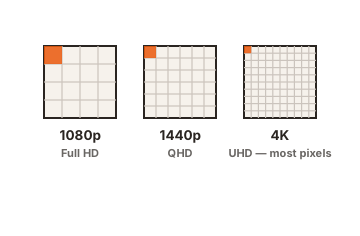
On a 16-inch panel, the pixels are packed into a small area, so even a Full HD (1080p) resolution looks reasonably crisp. Because the screen is small, you do not need an extremely high resolution to get sharp text, which is part of why portable monitors stay affordable.
A 32-inch panel is the opposite situation. Spreading a low resolution across such a large surface makes individual pixels easier to see, so text and edges can look soft or blocky. This is why 32-inch monitors are best paired with a high resolution, commonly 4K, to keep everything sharp. A 32-inch screen at only 1080p will look noticeably less crisp than a smaller screen at the same resolution.
Desk space, ergonomics, and viewing distance
Beyond raw size, the two displays ask very different things of your space and your seating position.
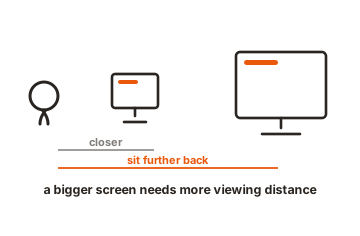
A 16-inch monitor fits almost anywhere. It works on a small desk, a kitchen table, an airplane tray, or a tight co-working spot, and you sit close to it much as you would a laptop. Comfort is rarely an issue because the screen is small enough to take in at a glance.
A 32-inch monitor needs more planning. It is wide, so it benefits from a desk with enough width to hold it and enough depth to let you sit back. If you sit too close to a 32-inch screen, you end up moving your head and eyes to reach the corners, which gets tiring. A common guideline is to sit roughly three to four feet back from a 32-inch display and to keep the top of the screen near eye level. A monitor arm can help by freeing desk space and letting you push the screen back and adjust its height.
So part of the decision is simply practical: a 16-inch monitor adapts to almost any space, while a 32-inch monitor asks you to build the space around it.
Price and power
Cost and energy use track closely with size, and the gap between these two is wide.
A 16-inch portable monitor is generally inexpensive, both because the panel is small and because it often runs on low power drawn straight from a USB-C connection. That makes it easy on your wallet and friendly to a laptop battery when you are away from an outlet.
A 32-inch monitor costs more, especially the 4K and high-refresh models that this size suits best, and it uses more power, typically needing its own wall outlet. For a permanent desk setup that trade-off is usually well worth it, but it is a real difference if budget or energy use is a concern.
Which one should you choose?
With the differences laid out, the decision usually comes down to your situation rather than which screen is objectively better. Match yourself to one of these.
Choose a 16-inch monitor if…
- You travel or work in different places and want a screen you can carry.
- You mainly want to add a second display to a laptop without a permanent setup.
- Desk or table space is limited.
- You want something affordable and low-power that runs off a single cable.
Choose a 32-inch monitor if…
- You want a large, immersive screen for gaming, movies, or content creation.
- You multitask heavily and want several windows visible at once.
- You have a dedicated desk with room to spare and sit at a comfortable distance.
- Screen space matters more to you than portability or price.
If you found yourself nodding along to both lists, that is a strong sign you might actually want each of them for different moments, which leads to the last point.
Can you use both?
Yes, and plenty of people do, because the two sizes solve different problems rather than competing for the same one. A common setup is a 32-inch monitor as the main display at a home desk, paired with a 16-inch portable monitor that travels in a laptop bag for working away from home.
Used this way, they complement each other neatly: the big screen gives you a powerful, immersive base of operations, while the small screen keeps you productive on the move. Rather than thinking of it as 16 versus 32, many people end up with 16 and 32, each doing the job it is best at.
Conclusion
A 16-inch monitor and a 32-inch monitor are not really rivals; they are tools for different situations. The 16-inch is a portable, affordable, low-power screen that goes wherever you do and shines as a laptop companion. The 32-inch is a large, immersive desktop display with roughly four times the screen area, built for multitasking, gaming, and detailed work at a dedicated desk. Decide whether you value portability or screen space, check that the resolution suits the size, and the right choice becomes clear. And if you need both kinds of working, owning one of each is a genuinely sensible answer.
For more help choosing your next display, browse our monitor buying guides.
Frequently asked questions
Is a 32-inch monitor too big for a desk?
Not if your desk has enough width and depth. A 32-inch monitor works well when you can sit roughly three to four feet back and keep the top of the screen near eye level. On a shallow desk it can feel overwhelming, in which case a monitor arm to push it back, or a smaller size, may be more comfortable.
Can a 16-inch monitor be your main display?
It can, but it is small for full-time desktop work, since you are limited to about one main window at a time. It is better suited as a portable or second screen. If you want a single main display for a desk, a larger size is usually more comfortable.
Why does a 32-inch monitor need a higher resolution?
Because the same number of pixels is stretched across a much larger surface. At a low resolution, a 32-inch screen shows softer text and more visible pixels, so 4K is recommended to keep it sharp. A 16-inch screen looks fine at 1080p because its pixels are packed into a small area.
Is a 16-inch monitor good for gaming?
It can work for casual gaming, especially on the go, but the small screen is not immersive, and many portable panels have modest refresh rates. For a more engaging gaming experience at a desk, a larger screen with a high refresh rate is the better fit.
How much bigger is a 32-inch monitor than a 16-inch one?
A 32-inch monitor is twice the width and twice the height of a 16-inch one, which works out to about four times the total screen area. The diagonal only doubles, but the usable space grows far more than that, which is why the two feel so different in person.