How Much Power Does a Monitor Use? Watts, Cost, and How to Check
Table of contents
Most desktop monitors use between 15 and 60 watts while switched on and showing an image. A small 24-inch screen sits near the bottom of that range, and a big 32-inch or 4K panel sits near the top. Run a typical 30-watt monitor for a normal work week and it costs only a few dollars a year. So the honest short answer is this: your monitor is a small part of your power bill, and the exact number depends mostly on its size, its brightness, and how many hours it stays on.
Below you will find real wattage ranges by screen size, the cost of running one for a year, what happens on standby, and two easy ways to check your own screen. Every figure here is a planning number. Your model can land higher or lower, and this guide shows you how to find your exact draw.
How much power does a monitor use?
A monitor’s power use is measured in watts, which is simply how fast it pulls electricity. Modern LED-backlit screens are efficient, so a normal desktop monitor draws somewhere in the range shown below during everyday use.
| Monitor type | Typical power use | Notes |
|---|---|---|
| Portable (13 to 16 inch) | 4 to 15 W | Often powered over USB-C |
| Small (19 to 22 inch) | 15 to 30 W | Basic office screens |
| Standard (24 to 27 inch) | 20 to 45 W | The most common desktop size |
| Large (32 inch, 4K) | 35 to 70 W | More pixels and backlight |
| Ultrawide / high-end | 50 to 100+ W | Wide panels, high brightness, HDR |
These are figures for the screen actively on. A high number on the box, like 120 watts, is usually the maximum the monitor can ever pull at full brightness with everything turned up. In real daily use you will almost always sit well below that peak.
How much power does a monitor use by size?
Screen size is the single biggest thing that decides power use, because a bigger panel has more area to light up. Resolution adds to it too, since a sharper screen has more pixels to drive. Here is how the common desktop sizes compare.
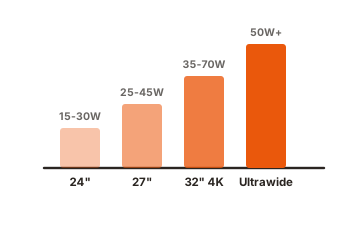
24-inch monitor (about 15 to 30 watts)
A 24-inch 1080p monitor is the workhorse of most desks, and it is gentle on power. Real-world meter readings for a 24-inch screen often land around 14 to 25 watts in normal use. If you want a low-power setup, this size is the sweet spot.
27-inch monitor (about 25 to 45 watts)
A 27-inch screen is the most popular size today, and it usually draws 25 to 45 watts. A higher-resolution 27-inch 4K panel works harder than a 1080p one of the same size, so it lands toward the top of that range. Efficient certified models can measure as low as the mid-20s.
32-inch and 4K monitors (about 35 to 70 watts)
A 32-inch panel, especially at 4K, needs more backlight and more pixels, so 35 to 70 watts is normal. Turn the brightness up and it climbs. These screens are still not power-hungry compared to most appliances, but they clearly cost more to run than a small office screen.
Ultrawide and OLED monitors (50 watts and up)
Ultrawide screens are physically wider, so they draw more, often 50 to 100 watts. OLED behaves differently because it lights each pixel on its own. A dark screen uses less, a bright white screen or HDR scene uses much more, so an OLED can swing anywhere from about 30 to over 100 watts depending on what is on it.
One useful reframe: a single 34-inch ultrawide can replace two 24-inch screens and end up using similar total power, so judge your whole desk, not the screen count. You can look up any certified model and its efficiency on the ENERGY STAR monitors list, which is the cleanest neutral source for real numbers.
What affects a monitor’s power use?
Beyond size, a handful of settings and specs move the number up or down. Knowing them helps you both estimate your draw and trim it.
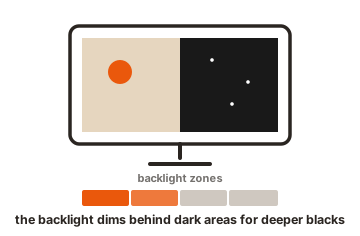
- Brightness. This is the biggest setting you control. The backlight is the hungriest part, so a screen at 100% brightness can use noticeably more than the same screen at 40%.
- Resolution. More pixels mean more work. A 4K panel uses more than a 1080p panel of the same size showing the same thing.
- Panel type. IPS, VA, and TN LCD panels are all fairly close. OLED and mini-LED can go higher during bright or HDR content.
- Refresh rate. Here is a surprise. A high refresh rate, like 144Hz or 240Hz, changes the monitor’s own draw very little, sometimes only about a watt. It mainly makes your graphics card work harder, which is a separate, larger cost.
- HDR mode. HDR pushes the backlight brighter to show bright highlights, so it raises power. Leaving HDR on for email and spreadsheets adds draw for no real benefit.
- Extra features. Built-in speakers, USB hubs, and webcams all sip a little more power when in use.
The takeaway: if you want to cut your monitor’s own power, lower the brightness first. It is the change you will actually notice on a meter.
How much does it cost to run a monitor per year?
The cost is smaller than most people expect. To work it out you need three numbers: the monitor’s watts, hours used per day, and your electricity rate. As of 2026 the average US home pays about 18 cents per kilowatt-hour (kWh), so the examples below use that.
The formula: watts ÷ 1000 × hours per day × 365 × price per kWh.
Take a 30-watt monitor used 8 hours a day:
- 30 watts ÷ 1000 = 0.03 kilowatts
- 0.03 × 8 hours = 0.24 kWh per day
- 0.24 × 365 = 87.6 kWh per year
- 87.6 × $0.18 = about $15.77 per year
So a normal monitor on a full work schedule costs roughly $16 a year to run. The table below shows a few common cases at the 2026 average rate.
| Setup | Hours/day | Cost per year (~$0.18/kWh) |
|---|---|---|
| 20 W (small office screen) | 8 | about $10.50 |
| 30 W (24 to 27 inch) | 8 | about $15.80 |
| 45 W (large / 4K) | 8 | about $23.70 |
| 45 W left on 24/7 | 24 | about $71.00 |
Your own rate matters a lot here. Electricity ranges from around 12 cents per kWh in the cheapest states to over 40 cents in Hawaii, so swap in your real rate for a true figure. But the pattern holds everywhere: for a single monitor, this is a small line on your bill.
How much power does a monitor use on standby?
Very little. A modern monitor in sleep mode, where the screen is black but the power light is on, draws well under a watt. The ENERGY STAR specification requires certified monitors to use 0.5 watts or less in sleep mode, and most modern screens meet that easily.
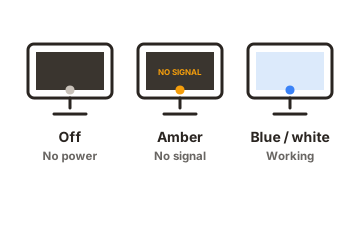
At half a watt running all year, standby costs a few cents. Even at 1 watt, a monitor left in sleep 24/7 uses about 8.8 kWh over a year, roughly $1.50 at the average rate. Older screens from a decade ago could draw 5 watts or more asleep, so if you still use one, that adds up faster.
How to check your own monitor’s power use
Ranges are useful, but your exact monitor is easy to pin down. There are two reliable ways, one instant and one exact.
Check the label or spec sheet (instant)
Look at the sticker on the back of the monitor, or find your model on the maker’s website. You will usually see a rated power figure, often listed as both typical and maximum. The typical number is close to real everyday use. This gives you a solid estimate in under a minute.
Use a plug-in power meter (exact)
For a real measurement, plug a cheap energy meter (often called a plug-in wattmeter) into the wall, then plug the monitor into it. It shows live watts. Do it in two steps to learn the most:
-
Active draw
Turn the monitor on, use it at your normal brightness, and read the watts. That is your baseline. -
Standby draw
Put it to sleep and watch the number fall. The lower reading is your true standby power.
This turns a guess into a fact, and it lets you test settings. Drop the brightness and watch the number move, and you will see exactly what each change saves.
How to lower your monitor’s power use
If you want to trim the draw, a few simple changes do most of the work. None of them hurt how the screen looks for normal tasks.
- Turn down brightness. The single most effective step. A comfortable, slightly lower brightness can cut real watts and is easier on your eyes indoors.
- Set a short sleep timer. Let the screen sleep after a few minutes idle, so it stops drawing full power when you step away.
- Turn HDR off for daily work. Keep it for movies and HDR games, where the gain is obvious. It adds nothing to a spreadsheet.
- Use an eco or auto-brightness mode. Many monitors adjust to room light and shave power without you noticing.
- Pick an efficient model when buying. A certified monitor generally uses noticeably less than a conventional one of the same size.
- Right-size the screen. Buy the size you actually use. A giant panel that you run at half brightness may still cost more than a well-chosen smaller one.
Conclusion
Most monitors use 15 to 60 watts on, with size and brightness driving the number, and standby draw is under a watt on modern screens. That means a typical monitor costs only about $10 to $25 a year to run at average US rates. To get your exact figure, check the label for a quick estimate or use a plug-in meter for a precise reading, then lower the brightness if you want to trim it. A good result is a comfortable screen that barely registers on your bill.
For more on reading a spec sheet properly, browse our monitor specs guides.
Frequently asked questions
Does a monitor use more power than a laptop?
Usually yes for an external monitor on its own, since a whole laptop often runs on 30 to 60 watts including its screen, while a desktop monitor alone can draw 20 to 60 watts. The exact answer depends on both models.
How many watts does a 27-inch monitor use?
A 27-inch monitor typically uses 25 to 45 watts in normal use. A 4K 27-inch panel sits toward the top of that range, while an efficient 1080p or 1440p model can measure in the mid-20s.
Is it cheaper to leave a monitor on or turn it off?
Turning it off, or letting it sleep, is always cheaper. Sleep mode draws under a watt, so there is no meaningful wear or cost benefit to leaving a modern monitor on when you are away.
Does a higher refresh rate use more power?
The monitor's own draw barely changes with refresh rate, sometimes only about a watt. The bigger cost is your graphics card, which works harder to feed a 144Hz or 240Hz screen.
How do I find the exact wattage of my monitor?
Check the label on the back or the maker's spec sheet for a rated figure, or plug the monitor into a cheap wattmeter for a live reading. The meter is the only way to see your true everyday draw.