DCR Monitor: What Dynamic Contrast Ratio Really Means
Table of contents
DCR stands for Dynamic Contrast Ratio. It is a monitor setting that changes the screen’s backlight brightness on the fly, based on what you are looking at. Dark scene? It dims the backlight so blacks look deeper. Bright scene? It pushes the backlight up so whites look brighter. The goal is to make the picture feel like it has more contrast than the panel can really produce on its own.
That one-line answer covers most of what people need. The rest of this guide explains how DCR works, why monitor boxes claim contrast numbers in the millions, and the part that trips up most people: whether you should actually leave it on.
What is DCR on a monitor?
DCR is a built-in feature that automatically adjusts your monitor’s backlight to boost the gap between the darkest and brightest parts of the picture. You will see it called Dynamic Contrast Ratio in spec sheets, and it lives in your monitor’s own menu, not in Windows or macOS.
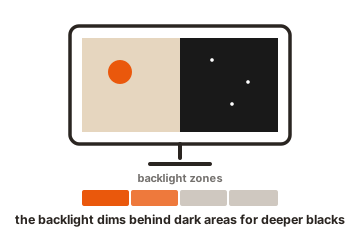
Here is the idea in plain terms. Your monitor has a light behind the screen called the backlight. Normally that light stays at one level while you use it. With DCR switched on, the monitor watches the video coming in and turns that backlight up or down many times a second to match the scene. The picture you see ends up with darker darks and brighter brights than it would with the backlight sitting still.
One thing worth knowing up front: DCR only works on LCD screens, because those are the ones with a separate backlight to adjust. OLED panels light each pixel on their own and can switch a pixel fully off, so they already produce deep blacks and high contrast without needing this trick.
How DCR works
DCR runs as a small loop inside the monitor’s processing chip. It happens automatically, frame after frame, the whole time the feature is on.
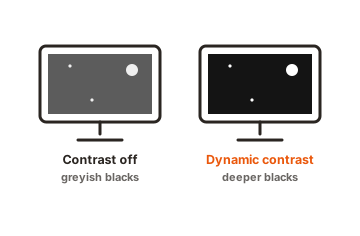
- Read the scene. The chip looks at each frame coming through the cable and works out how dark or bright it is overall.
- Adjust the backlight. If the frame is mostly dark, it lowers the backlight power. If the frame is mostly bright, it raises it. Most monitors scale the light up or down by degrees rather than flipping it fully on or off.
- Smooth the change. To avoid harsh jumps when a scene changes fast, the monitor eases the brightness across a few frames instead of snapping to the new level.
That smoothing step is the catch. Easing the backlight over several frames is what stops the screen from flickering, but it also adds a tiny delay between what the image needs and what the backlight does. For movies you will never notice it. For fast games, that delay is the reason many players turn DCR off, which we will get to below.
The backlight itself is usually dimmed using a technique that switches the LEDs on and off very quickly, called pulse-width modulation. If you want the deeper background on how backlight dimming and pulse-width modulation work, the display side of it is well documented, but the short version is simple: faster, smaller adjustments mean smoother dimming.
DCR vs static contrast ratio: why the huge numbers?
Static contrast ratio is the real, fixed number: the brightest white the panel can show next to the darkest black it can show at the same moment. A typical monitor sits somewhere around 1000:1 to 3000:1. That figure does not change, and it tells you what the screen can truly do.
DCR is measured differently, and that is why the numbers balloon. To get the dynamic figure, the brightest white is measured with the backlight cranked all the way up, and the darkest black is measured with the backlight turned all the way down. Those two readings come from separate moments, then get divided. That is how a panel with a real 1000:1 ratio ends up on the box as 20,000,000:1 or higher.
Should you turn DCR on or off?
Here is when it helps and when it gets in the way.
When DCR is worth using
- Movies and shows. This is what DCR is best at. Dark, moody scenes get deeper blacks, and the picture feels richer.
- Casual and slower games. In an atmospheric single-player game, the extra contrast can make shadows and lit areas pop, and the small added delay does not matter.
- Everyday browsing and video. For general use, a little more contrast can make content look livelier with no real downside.
When to leave DCR off
- Fast competitive games. The backlight smoothing adds a small delay, and the brightness shifts can be distracting in a firefight. Most serious players keep it off.
- Photo, video, and design work. DCR shifts brightness to boost contrast, which throws off how colors actually look. If you edit images, an edit that looks right on your screen can look wrong on someone else’s. Keep it off and calibrate instead.
- Mostly static work. For documents, spreadsheets, and code, the screen content barely changes, so DCR has little to do and can cause odd brightness shifts when a mostly white or mostly dark window fills the screen.
The best move is to try it both ways on your own monitor. Cheaper screens tend to overdo the effect and crush shadow detail or blow out highlights, while better screens handle it more gently. If yours looks off with DCR on, and the menu offers Low, Medium, and High levels, Medium is usually the safest middle ground.
DCR vs HDR: they are not the same
These two get mixed up constantly, but they do different jobs. DCR adjusts the backlight to fake stronger contrast on a normal signal. HDR is a richer video format that carries brightness and color information far beyond standard video, and it needs both a monitor and content built for it. The table below sums up the difference.
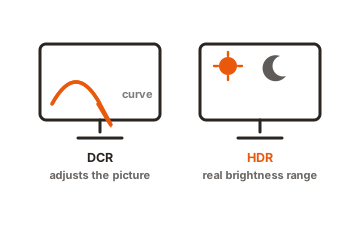
| DCR | HDR | |
|---|---|---|
| What it does | Adjusts the backlight to boost perceived contrast | Carries a wider range of brightness and color in the video itself |
| Needs special content? | No, works with anything on screen | Yes, the content must be made in HDR |
| Needs special hardware? | No, built into most LCD monitors | Yes, a true HDR-capable display |
| Best for | Adding punch to normal video and movies | Getting the most from HDR films and games |
How to find and change the DCR setting
DCR lives in your monitor’s on-screen menu, known as the OSD. You open it with the physical buttons or the little joystick on the monitor, usually on the bottom edge, the side, or the back. From there the steps are the same on every brand.
- Press the Menu button (or push the joystick in) to open the on-screen menu.
- Go to the Picture, Image, or Display section.
- Look for DCR or Dynamic Contrast and set it On, Off, or to a level if your monitor offers them.
The tricky part is that brands rename it. If you cannot find “DCR,” you are likely looking at one of these instead:
- ASUS: ASUS Smart Contrast Ratio (ASCR).
- Acer: ACM, short for Adaptive Contrast Management.
- Samsung: often tied to Dynamic Contrast or a Magic Bright / Dynamic picture mode.
- ViewSonic and others: usually listed plainly as Dynamic Contrast or Advanced DCR.
Conclusion
DCR is a free, built-in setting that auto-adjusts your monitor’s backlight to make contrast look stronger, dimming dark scenes and brightening bright ones. Turn it on for movies and relaxed viewing, where the deeper blacks are a nice bonus. Turn it off for fast competitive games and any color-accurate work, where the small delay and shifted brightness do more harm than good. Try both on your own screen, and judge by what looks right to you.
Want more display settings demystified? See what overdrive does on a monitor, or browse all our monitor specs guides.
Frequently asked questions
What does DCR mean on a monitor?
DCR means Dynamic Contrast Ratio. It is a setting that automatically raises or lowers the screen's backlight based on the picture, making dark areas look darker and bright areas look brighter for a stronger sense of contrast.
Should I turn DCR on or off for gaming?
For fast competitive games, off is better, because the backlight smoothing adds a small delay and the brightness shifts can distract. For slower, atmospheric single-player games, on can look great, so it comes down to the game and your taste.
Does DCR damage your monitor?
No. DCR just adjusts backlight brightness, which is no harder on the screen than changing the brightness yourself. It will not wear your monitor out or shorten its life in any meaningful way.
Why does my monitor claim a contrast ratio in the millions?
That is the DCR number, measured by comparing peak brightness and minimum black taken at separate moments. The screen can never show both at once, so it is a lab figure. Compare the static contrast ratio for a realistic read.
Is DCR the same as HDR?
No. DCR tweaks the backlight to fake more contrast on normal video. HDR is a richer video format that needs special content and a capable display. DCR works with anything, while HDR only kicks in with HDR content.