Can You Play 1440p on a 4K Monitor? Yes, But Do It Right
Table of contents
Yes. Select 2560x1440 in a game or in Windows and a 4K monitor will display it without complaint. The real question is whether it looks any good, and the honest answer is that setting the resolution to 1440p is the worst of the three ways to get 1440p performance out of a 4K screen. The reason is arithmetic: 1440p does not divide evenly into 4K, so something has to blur. There are two better routes to the same frame rate, and both keep the picture sharp.
What actually happens when you select 1440p
A 4K panel has a fixed grid of 3840 by 2160 physical pixels. Feed it 2560 by 1440 and every source pixel has to be stretched across 1.5 pixels in each direction, or 2.25 pixels of area. Since you cannot light up a quarter of a pixel, the scaler interpolates, blending neighbouring values to approximate what should be there. That blending is what you perceive as softness, and it lands hardest on fine detail and text.
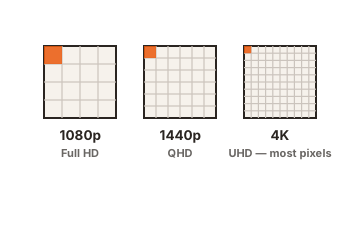
Compare that with 1080p, which divides into 4K exactly twice in each direction.
| Source | Scale to 4K | Clean multiple | Result |
|---|---|---|---|
| 1920x1080 | 2.0x | Yes | Each pixel becomes a block of four, no blending needed |
| 2560x1440 | 1.5x | No | Interpolated, visibly softer |
| 3840x2160 | 1.0x | Native | Nothing to scale |
That produces a result most people find counterintuitive: on a 4K monitor, 1080p can look cleaner than 1440p, even though 1440p has more pixels. Higher resolution loses to tidier maths.
What you gain in frame rate
The reason anyone asks this question is performance, so it helps to know the size of the prize. 4K is 8.29 million pixels and 1440p is 3.69 million, so you are asking the graphics card to draw about 2.25 times fewer pixels per frame.
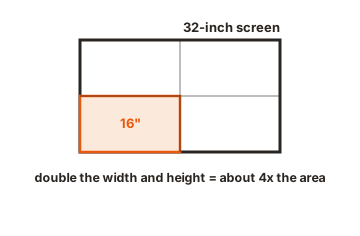
In a game where the graphics card is the limiting factor, frame rates rise roughly in proportion, so 40fps at 4K lands somewhere near 80 to 90fps at 1440p. The gain shrinks when something else is the bottleneck. If your processor is already the limit, or the game is capped, dropping resolution buys you far less than the arithmetic suggests, and you have traded sharpness for nothing.
Who does the scaling matters
Two devices can do the stretching, and you get to choose.
The monitor’s internal scaler handles it by default. Quality varies enormously between models, and it usually adds a small amount of input lag.
Your graphics card can do it instead. On NVIDIA, display settings now live in the NVIDIA app under the System tab, since the classic Control Panel was retired in May 2026. On AMD, the equivalent sits in Adrenalin under Display. GPU scaling gives you consistent behaviour across monitors and control over aspect ratio, which matters if you ever run a non-16:9 resolution.
Recent graphics cards also offer integer scaling, which multiplies each pixel by a whole number with no blending at all. It is exactly what you want for 1080p on a 4K panel. It does nothing for 1440p, because 1.5 is not a whole number, so the option either greys out or falls back to ordinary interpolation.
The better way: keep the output at 4K
What you actually want is 1440p rendering cost with 4K presentation. Two features do exactly that, and both beat changing the display resolution.
The first is upscaling. DLSS, along with AMD’s FSR and Intel’s XeSS, renders the game at a lower internal resolution and reconstructs the output at full resolution. The Quality preset renders at 66.7 percent per axis, and 66.7 percent of 3840 by 2160 is 2560 by 1440. So DLSS Quality on a 4K monitor is, quite literally, rendering at 1440p and displaying at 4K. You get the frame rate you were chasing and a sharper image than setting the panel to 1440p.
The second is the in-game resolution scale slider, which most modern titles include. It does the same thing without the reconstruction, rendering the 3D scene at a percentage of native while the game still outputs 4K.
Both share a decisive advantage. The menus, HUD, subtitles and text are still drawn at 4K, so the parts of the screen you read stay crisp while only the rendered world is scaled. Changing the display resolution blurs everything equally.
When setting the display to 1440p still makes sense
The old approach has not disappeared, and there are cases for it.
- Older games with no upscaler and no resolution scale slider leave you no other lever.
- Competitive shooters, where you want maximum frame rate and are not looking at scenery anyway. Softness matters less when your eyes are on a crosshair.
- Monitors that run faster at lower resolutions, where dropping resolution allows a higher refresh rate.
- Troubleshooting, when you are working out whether a performance problem is resolution-related at all.
In those cases, set GPU scaling with aspect ratio preserved, and accept the softness as the price of the frame rate.
A 4K panel at 1440p is not the same as a 1440p panel
If you are still choosing hardware, this distinction is worth holding onto. A native 1440p monitor lights its own pixels one for one, so the image is as sharp as the resolution allows. A 4K monitor fed 1440p is interpolating, so it will always look softer than the native panel showing the same thing.
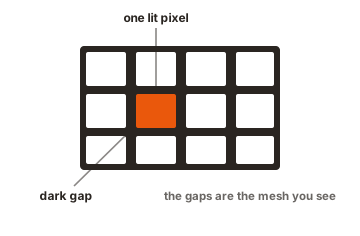
That is not an argument against 4K. A 4K monitor running native, with upscaling handling the performance, ends up ahead of both. It is an argument against buying a 4K panel with the plan of simply running it at 1440p forever, because that plan gives you a worse picture than the cheaper monitor would have.
Do not run your desktop at 1440p
Whatever you decide for games, leave the Windows desktop at 3840 by 2160. Running the desktop below native applies that same interpolation to every line of text you read all day, which is the most visible possible use of it.
If things are too small at native, raise the scaling instead. On a 27 inch 4K panel, 150 percent scaling gives you an effective workspace of 2560 by 1440, the same room as a 1440p monitor, with everything rendered at four times the pixel count. That is the setting that makes a 4K monitor comfortable, and it costs you nothing in performance.
Quick setup
- Leave the display at 3840 x 2160 in Windows display settings and set scaling to whatever is comfortable, usually 150 percent at 27 inches.
- In the game, keep the resolution at 4K and turn on DLSS, FSR or XeSS at the Quality preset.
- If the game has no upscaler, look for a resolution scale or render scale slider and set it to around 67 percent.
- Only if neither exists, drop the game resolution to 2560 x 1440, and set your graphics driver to handle scaling with aspect ratio maintained.
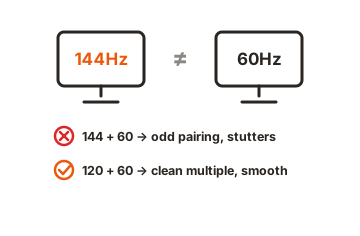
- Check your refresh rate afterwards, because changing resolution can reset it to a lower value.
Conclusion
You can play at 1440p on a 4K monitor, and nothing breaks when you do. It simply looks softer than it needs to, because 1440p scales into 4K by an awkward factor of 1.5 and the scaler has to guess. Upscaling at the Quality preset gives you the same 2560 by 1440 render cost with a genuine 4K output and sharp menus, which makes it the better answer in almost every modern game. Keep the display at native, let the game do the scaling, and change the panel resolution only when a game gives you no other option.
For more, see our monitor specs guides.
Frequently asked questions
Does 1440p look bad on a 4K monitor?
Softer rather than bad. The 1.5x scale means every pixel is interpolated, so fine detail and text lose definition. It is perfectly playable, just not as sharp as the same game upscaled from 1440p to a 4K output.
Is 1080p sharper than 1440p on a 4K screen?
It can be, because 1080p is an exact 2x multiple and can be scaled without blending, especially with integer scaling enabled. 1440p never gets that treatment on a 4K panel.
Does running a lower resolution damage the monitor?
No. The scaler is doing what it was built for. The only costs are image softness and a small amount of added latency if the monitor handles the scaling.
Should the GPU or the monitor do the scaling?
The graphics card, in most cases, for consistent results and aspect ratio control. A monitor with a good scaler may shave a fraction of a millisecond of latency, which matters only in competitive play.
Is DLSS Quality the same as playing at 1440p?
In rendering cost, yes, since it renders at 2560 by 1440 on a 4K output. In image quality it is better, because it reconstructs to full resolution and leaves the interface untouched at 4K.