Is Sceptre a Good Monitor Brand? An Honest Look
Table of contents
Yes, Sceptre is a good monitor brand if your main goal is a lot of screen for very little money. You get a bigger panel, a higher refresh rate, and deeper contrast than most other names sell at the same price. The catch is simple: the build is plain plastic, the stand usually only tilts, and the color out of the box is average until you tweak it. For a student, a home office, or a casual gamer on a tight budget, that is a fair trade. For color work or a premium feel, it is not.
Here is what Sceptre does well, where it comes up short, and who should actually buy one.
So, is Sceptre a good monitor brand?
For the price, yes. Sceptre sells value first, and it delivers on that promise more often than not. A Sceptre panel tends to cost less than a similar model from Dell, LG, or ASUS, sometimes by fifty dollars or more, while still hitting the same size and refresh rate on paper.
The way it keeps prices low is by spending on the parts that affect the picture and saving everywhere else. So you get a strong panel wrapped in a basic body. If you care about the image and the price and can live without a metal stand or a fancy menu, that math works in your favor. If you want a display that feels expensive and nails color right away, you will want to spend more.
Who is Sceptre?
Sceptre is a privately owned American electronics company. It started in 1984 in the City of Industry, California, and has focused on affordable displays ever since. It began with computer monitors, moved into LCD in the 1990s, and now sells LED monitors, 4K panels, curved gaming screens, and TVs. You can see its current lineup on Sceptre’s own site.
Like most budget display makers, Sceptre does not run its own panel factories. It buys panels and parts and assembles the finished product, which is normal at this price point and is a big reason the monitors cost what they do. The company is small, and it competes on price rather than brand name, so you will not see the marketing budget of the giants behind it. That is part of why a Sceptre panel can undercut them.
What you get for the money
Sceptre packs in features that usually cost more elsewhere. A few things stand out across the lineup.
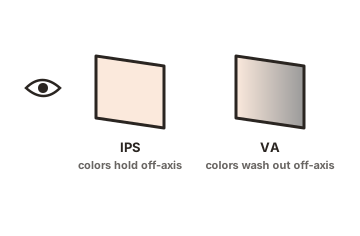
- Deep contrast. Most Sceptre panels use VA technology, which reaches a static contrast ratio of about 3,000:1. Blacks look genuinely dark, so movies and games feel rich in a dim room, better than a typical cheap IPS screen can manage.
- Higher refresh rates. Almost every Sceptre monitor starts at 75Hz instead of the old 60Hz standard, and the gaming models climb to 144Hz, 165Hz, and beyond. That means smoother motion for everyday scrolling and fast games.
- Solid color coverage. Many models cover close to 99% of the sRGB range, which is plenty for photos, video, and general use once the screen is set up properly.
- Big screens for less. Sizes run from 22 inches up to 34 and 35 inch ultrawides, and Sceptre is often the cheapest way to get onto a large or curved panel.
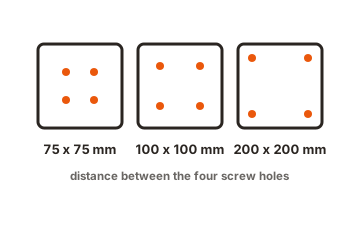
- Extras thrown in. Built in speakers and VESA mounting holes show up on most models. The speakers are weak 2 to 3 watt units, fine for a video call or a quick clip, but the VESA holes are genuinely useful since they let you swap the basic stand for a better arm.
Put together, that is a lot of hardware for the money. The picture punches above what the price tag suggests, which is the whole reason people keep asking about the brand.
Where Sceptre monitors fall short
The savings have to come from somewhere, and they show up in a few clear places. None of these are dealbreakers for casual use, but you should know them going in.
- Plain build quality. The bodies are all plastic and feel light and hollow next to a Dell or ASUS. There is no metal, and the panels can flex if you handle them roughly.
- Basic stands. Most Sceptre stands only tilt. You cannot raise, swivel, or rotate the screen on the majority of models, so getting a comfortable height often means buying a separate mount.
- Average color out of the box. The panels can look accurate, but the factory settings usually are not dialed in. Colors often improve a lot after a quick calibration, which matters if you do any design or photo work.
- Some panel luck. A share of buyers report backlight bleed, the odd stuck pixel, or brightness that runs high. Quality varies from unit to unit more than it does on premium brands.
- Narrow viewing angles. VA panels look great head on but wash out and shift color when you sit off to the side, which is worth remembering for a shared screen.
If accurate color is the point of your purchase, test the unit when it arrives and be ready to calibrate. Independent testing labs like RTINGS measure these exact traits model by model, so it is worth checking a specific Sceptre before you buy rather than judging the whole brand at once.
Are Sceptre monitors good for gaming?
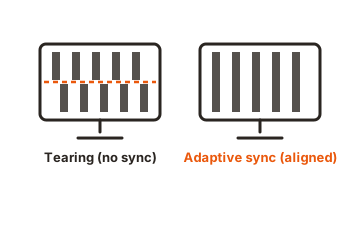
For casual and mid level gaming, yes, and this is where Sceptre makes the most sense. The high refresh rates and low prices line up neatly with what a budget gamer needs. A 144Hz or 165Hz Sceptre panel costs far less than a big brand equivalent, and most models support AMD FreeSync to cut screen tearing when your frame rate bounces around.
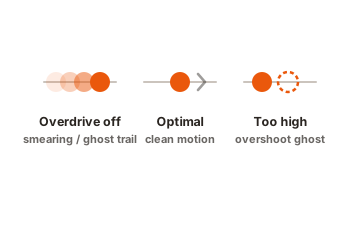
The deep VA contrast also helps games look punchy, especially darker titles. Response times are decent rather than elite, so you may notice slight smearing in fast, dark scenes, and the top rated refresh rate sometimes only works over a specific input like DisplayPort. Check the port and cable so you actually get the speed you paid for.
Where Sceptre stops making sense is high end competitive play. If you chase the fastest response times, the cleanest motion, or top tier color, you will feel the limits, and a premium brand is the better call. For everyone else playing on a budget rig, a Sceptre gaming monitor is one of the best value picks around.
How Sceptre compares to other budget brands
Sceptre sits right in the mix with other value names like AOC, ViewSonic, and Acer’s cheaper lines. On raw specs, it usually matches or beats them, often giving you a higher refresh rate or a bigger screen for the same money. Where the bigger budget brands pull ahead is polish: better stands, tighter factory color, and more consistent quality between units. The table below sums up the trade.
| What to look at | Where Sceptre does well | Where it falls short |
|---|---|---|
| Price | Often the cheapest way to get a given size and refresh rate | Fewer discounts than big brands during sales events |
| Contrast | VA panels hit about 3,000:1, so blacks look deep in a dark room | Viewing angles shift color and brightness off to the side |
| Refresh rate | Most panels start at 75Hz, with gaming models up to 165Hz or more | The rated speed sometimes needs a specific port to reach |
| Color | Many panels cover about 99% of sRGB once set up | Out of the box tuning is average, so it helps to calibrate |
| Build and stand | Light, simple, and VESA ready for an aftermarket arm | All plastic, tilt only on most, backlight bleed on some units |
In short, Sceptre wins on price and specs and gives up some ground on fit, finish, and consistency. If you want the most screen and speed per dollar, it is hard to beat. If you want a display that feels premium and works perfectly out of the box, a step up in budget pays off.
Who should buy a Sceptre monitor?
A Sceptre monitor is a smart buy if you fit one of these groups:
- Students and home offices that need a big, sharp screen without spending much.
- Casual and mid level gamers who want a high refresh rate on a tight budget.
- Anyone building a dual or triple monitor setup, where the savings add up fast.
- Movie and show watchers who want deep contrast in a dim room.
It is the wrong pick if you do color critical work like photo or video editing, if you want a premium build with a fully adjustable stand, or if you demand top tier gaming performance. For those needs, spend more on a brand like Dell, LG, or ASUS. For everyone else, Sceptre gives you a lot of monitor for the money.
Conclusion
Sceptre is a good monitor brand for value shoppers. Buy one when you want a large, high contrast, high refresh screen for the lowest price and can accept plain plastic build, a tilt only stand, and color that may need a quick tune. Skip it for color critical work or a premium feel. Match the model to your use, check the ports for the rated refresh rate, and inspect the panel on arrival. Do that, and a Sceptre delivers strong performance well below what the big names charge.
Still choosing? Compare sizes in our 16-inch vs 32-inch guide, or browse all our monitor buying guides.
Frequently asked questions
Are Sceptre monitors reliable?
Mostly, yes. Many owners run them for years without trouble, though quality varies more than on premium brands. Some units show backlight bleed or a stuck pixel, so check the screen soon after it arrives while returns are easy.
Does Sceptre make its own panels?
No. Sceptre buys panels and parts and assembles the finished monitors, which is normal for budget brands and a big reason the prices stay low. The picture quality still holds up well for the money.
How long do Sceptre monitors last?
With normal use, many last several years, and plenty of owners report far longer. The budget parts can wear sooner than premium ones, so lifespan is a bit less predictable than with high end brands.
Are Sceptre monitors good for the eyes?
They are fine for daily use. Most include a blue light filter and flicker reduction. If brightness feels high, turn it down in the menu, since a few models run bright out of the box.
Is Sceptre better than AOC or ViewSonic?
It is close. Sceptre often gives more screen and refresh rate per dollar, while AOC and ViewSonic can offer better stands and slightly more consistent quality. Compare the exact models you are weighing.