Is Z-Edge a Good Monitor Brand? An Honest Assessment
Table of contents
Z-Edge is a real company selling real monitors, and at the price it charges, the specifications are hard to argue with. Whether it is a good brand depends entirely on what you are comparing it against. It competes on features per dollar, not on warranty length, verified panel performance or support depth. For a second screen, a budget build or casual gaming, that trade works out. For a primary display you plan to keep for five years, the gaps matter. Here is what the brand actually is and how to judge it.
Who Z-Edge actually is
The company behind the name is Zero Edge Technology LLC, a US business founded in 2015. Monitors are one part of the range, alongside dash cams and portable displays, which is a slightly unusual mix but not a red flag on its own.
Like every brand at this end of the market, Z-Edge does not make panels. It specifies and sells displays built around panels sourced from the same handful of manufacturers everyone else uses. That is worth understanding, because it means the panel inside a budget monitor is often closer to the one in a name-brand model than the price gap suggests. What differs is the electronics around it, the tuning, the quality control and what happens when something goes wrong.
You will find the products through Amazon, Newegg, Walmart and Office Depot rather than in the channels the major brands dominate.
What the lineup looks like
The pattern across the range is high refresh rates and large sizes at prices well under the established brands.
| Type | Typical specification | Rough price |
|---|---|---|
| 24 inch 1080p | 240Hz IPS | Around $130 |
| 27 inch 1440p | 144Hz fast IPS, adjustable stand | Around $150 |
| 27 inch 1080p curved | 280Hz to 300Hz | Around $150 to $170 |
| 30 inch ultrawide | 2560x1080, 200Hz curved | Around $190 |
| 34 inch ultrawide | 3440x1440, 165Hz curved | Around $230 |
| 49 inch super ultrawide | 5120x1440, 144Hz IPS | Around $700 |
Prices move around, so treat those as a guide rather than a quote. Most models carry FreeSync compatibility, two HDMI and two DisplayPort inputs, and built-in speakers, which is a more generous port count than several pricier competitors offer.
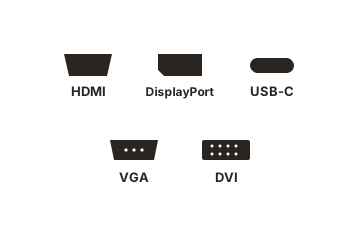
Stands are the usual budget compromise, with tilt-only adjustment on most of the range. A few models do include height, tilt and swivel, which is worth looking for, because a monitor you cannot raise to eye level costs you either an arm or your neck.
Panel type tells you more than the badge does
Two different products sit inside the range, and they behave differently.
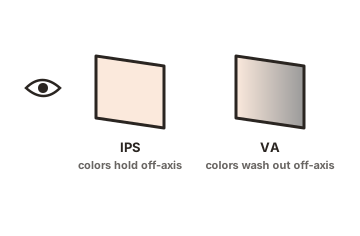
The curved models are generally VA panels. VA gives strong contrast, which suits dark games and films, and it is slower to change between dark shades, which shows up as smearing behind moving objects in night scenes. That characteristic belongs to the panel technology rather than to the brand, and it appears on VA monitors costing three times as much.
The flat models are generally IPS. IPS gives better viewing angles and more consistent colour across the screen, and gives up contrast in return, so blacks look grey in a dark room.
Neither is better in the abstract. Decide which trade you want before you compare prices, because it narrows the shortlist faster than any other single question.
The warranty is the clearest difference
This is the number that separates the tiers, and it is easy to check.
Z-Edge’s warranty terms set the default period at 12 months from the shipping date, extendable to 24 months on monitors if you register the product on their site within 30 days of delivery. There is also a 30-day money-back guarantee. Most established monitor brands run a three-year baseline on consumer displays without requiring registration.
Two practical consequences follow. Register the moment it arrives, because leaving it doubles your exposure for the sake of five minutes. And treat the retailer’s return window, not the warranty, as your real protection: test the monitor thoroughly in week one, when sending it back is still trivial.
What you give up at this price
The honest answer is verification.
Major monitor lines get put through independent labs, so before you buy you can look up measured response times, overshoot behaviour, gamma tracking, colour accuracy against sRGB and backlight uniformity. Coverage of budget brands is thin, so with a Z-Edge you are buying on the specification sheet rather than on measurements. That is not the same as saying the panel is bad. It means you cannot know in advance, and you find out when the box opens.
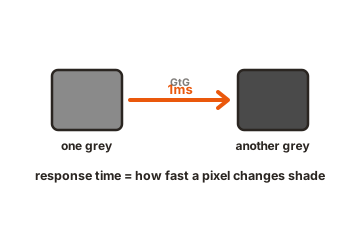
The specifications themselves need reading carefully too. A “1ms” figure on a high refresh budget monitor is almost always MPRT, which describes how long a frame is visible rather than how fast a pixel changes colour, and it is measured with a strobing backlight mode active. GtG response, the number that governs smearing behind moving objects, is usually not published at all.
You also give up the extras that arrive higher up the range: USB-C with power delivery, KVM switching, hardware calibration, firmware updates over the life of the product, and next-business-day replacement service.
How to judge any budget monitor brand
The same short checklist works for Z-Edge and for every competitor at the price.
-
Read the response time figure properly
Find out whether it is GtG or MPRT. If only MPRT is quoted, assume pixel response is average. - Look for third-party certification rather than marketing words. Programmes such as VESA’s ClearMR and VESA Certified AdaptiveSync are tested by approved labs, so a badge means something a phrase on a box does not.
-
Look for third-party certification rather than marketing words
Programmes such as VESA’s ClearMR and VESA Certified AdaptiveSync are tested by approved labs, so a badge means something a phrase on a box does not. -
Check the warranty length and any registration requirement
A short default period with an opt-in extension is a meaningful cost, because most people never register. -
Buy where returns are easy
With an unverified brand, a retailer with a long, no-questions return policy is worth more than a small saving elsewhere. -
Test on day one
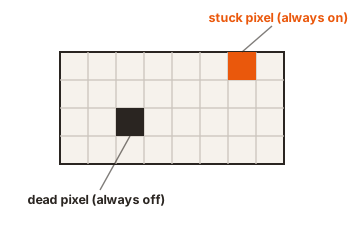
Full-screen white, black and solid colours for dead pixels and uniformity, a dark room check for backlight bleed, and a motion test for overdrive artefacts. -
Test on day one
Full-screen white, black and solid colours for dead pixels and uniformity, a dark room check for backlight bleed, and a motion test for overdrive artefacts.
Who it suits, and who it does not
A Z-Edge makes sense if you want a large or high refresh panel for the least money, and the display is not the centre of your working life. Second and third monitors, ultrawides on a tight budget, console and casual gaming, student setups and family machines all fit that description comfortably.
It is a weaker choice if colour accuracy affects your income, if you compete in games where verified low latency is part of the equipment, or if you want a display you will still be running in 2032 with support behind it. In those cases the extra spend on an established brand buys measured performance, a longer warranty and a service route, which is exactly what the price difference represents.
Conclusion
Z-Edge is a legitimate budget brand rather than a bargain version of a premium one. The specifications are genuinely competitive for the money, the port selection is better than most rivals, and the warranty is shorter than the industry norm unless you register. Judge it on that basis: buy from a retailer with a generous return window, register immediately, test the panel in the first week, and read the response time figure for what it actually measures. Do those four things and a budget monitor stops being a gamble.
For how other value names compare, see our honest takes on Sceptre and Titan Army.
For more, see our monitor buying guides.
Frequently asked questions
Is Z-Edge a Chinese company?
Zero Edge Technology LLC is a US company, founded in 2015. Like nearly all monitor brands at this price, its products are manufactured in Asia around panels bought from third-party suppliers.
How long is the Z-Edge monitor warranty?
Twelve months by default from the shipping date, extended to 24 months on monitors if you register the product within 30 days of delivery. There is a separate 30-day money-back guarantee.
Are Z-Edge monitors good for gaming?
For casual and console gaming, the refresh rates and prices are attractive. For competitive play, the lack of published GtG response times and independent testing makes performance harder to predict than with a brand that publishes both.
Does Z-Edge make good ultrawide monitors?
The ultrawide range is where the price advantage is largest, with 34 inch 3440x1440 and 49 inch 5120x1440 models well below established brands. The same caveats about verification and warranty length apply.
Is a cheap monitor brand worth the risk?
It depends on how you buy it. Bought from a retailer with easy returns, tested in the first week and registered for the full warranty, the downside is small. Bought without those steps, you are relying on the first unit being good.