What's a Good Size Monitor for Gaming? 24, 27 or 32 Inch Compared
Table of contents
For most people, 27 inches paired with 1440p. That combination sits where the volume of the market is, which keeps prices sharp, and it is large enough to feel immersive without demanding a huge graphics card. But a diagonal measurement on its own tells you very little. What your eyes respond to is how much of your vision the screen fills, and that depends on how far away you sit just as much as on the size of the panel. Sort out those two together and anything from 24 to 32 inches can be the right answer.
Start with how much of your vision it fills
A 16:9 screen is about 0.87 times its diagonal in width, so a 27 inch monitor is roughly 23.5 inches across and a 32 inch is 27.9 inches. Combine that width with your viewing distance and you get the angle the screen covers, which is the number that actually matters.
| Size | Width | Distance for about 47 to 49 degrees |
|---|---|---|
| 24.5 inch | 21.4 in | 60 cm |
| 27 inch | 23.5 in | 68 to 70 cm |
| 32 inch | 27.9 in | 80 cm |
The pattern is simple enough to remember: every step up in size needs roughly another 10 centimetres of distance to feel the same. Move a 32 inch monitor to 60 centimetres and it covers 61 degrees of your view, which is a lot of head movement to check a corner of the screen. Push a 24.5 inch panel out to 80 centimetres and it shrinks to 37 degrees, which starts to feel like watching a game rather than being in it.
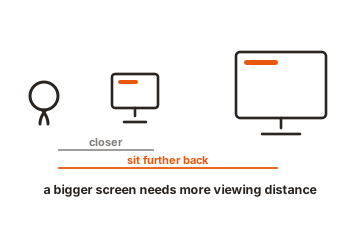
That is why size arguments so often go nowhere. Two people can genuinely have opposite experiences of the same monitor because one of them sits 20 centimetres further back.
The three sizes that matter
24 to 25 inches is the competitive standard, and that is not marketing. BenQ ZOWIE’s esports range, which supplies the official displays for IEM tournament stages, is built around 24.5 inch panels for exactly this reason: the whole screen stays inside your central field of view at a normal desk distance, so you can check the minimap, ammo count and crosshair without moving your head. It also suits shallow desks and pairs with the highest refresh rates on the market.
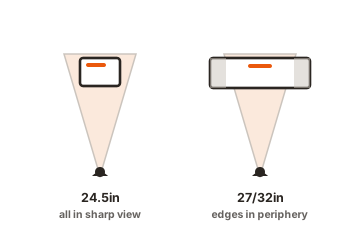
27 inches is the default recommendation for a reason. It is noticeably more involving than 24 inches, it still fits a standard desk, and at 1440p it lands at a pixel density that looks sharp without needing a flagship graphics card. It is also the most competitive segment in the market, so you get more monitor per pound or dollar here than anywhere else.
32 inches is the immersion choice. It genuinely feels different in single player games, and it makes a good desktop for everything else. It needs a deeper desk, a stronger graphics card because you should be running it at 4K, and a bit of tolerance for turning your head.
Size and resolution are one decision
Pick these together or you will be disappointed by one of them.
- 24 to 25 inches works with 1080p, and 1440p at this size is genuinely sharp if you want it.
- 27 inches wants 1440p. This is the pairing most people should buy.
- 32 inches wants 4K.
- Two combinations are worth avoiding. A 27 inch 1080p panel spreads too few pixels across too much glass and looks coarse at desk distance. A 32 inch 1440p panel has the same problem in milder form. Both exist because they are cheap, and both are the kind of saving you notice every day.
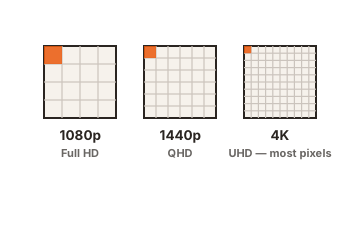
Two combinations are worth avoiding. A 27 inch 1080p panel spreads too few pixels across too much glass and looks coarse at desk distance. A 32 inch 1440p panel has the same problem in milder form. Both exist because they are cheap, and both are the kind of saving you notice every day.
For context on what people actually run, Valve’s Steam Hardware Survey had 1080p as the most common primary resolution at 52.21 percent in April 2026, with 1440p at 21.41 percent and climbing. The market is moving toward the 27 inch 1440p pairing rather than toward 4K.
Genre changes the answer
What you play shifts the recommendation more than any spec.
Competitive shooters reward the smaller end. Faster scanning, less head movement, and the highest refresh panels tend to be 24 to 27 inches anyway.
Racing and flight sims reward the opposite. Peripheral vision carries real information, so bigger is better, and this is the genre where ultrawide and triple-monitor setups earn their keep.
Single player games, role-playing games and strategy titles sit comfortably at 32 inches, where the extra screen either adds atmosphere or shows you more of the map.
If you play a mixture, which most people do, the 27 inch answer is a compromise that annoys nobody.
Curvature matters more as the screen grows
Curve is really a size question in disguise. On a 24 or 27 inch flat panel, the corners are only slightly further from your eyes than the centre, so a curve adds little. Push out to 32 inches and beyond, and that difference becomes noticeable, which is why curvature is common at the larger sizes and rare at the smaller ones.
The number quoted, such as 1500R or 1000R, is the radius of the circle the screen is part of, in millimetres. A smaller number means a more aggressive curve, and roughly speaking the radius should be close to your viewing distance. A 1000R panel is designed for someone sitting about a metre away.
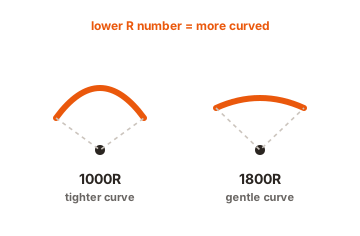
For competitive play, flat remains the norm, partly because straight lines stay straight and partly because the panels are small enough not to need it.
The fastest panels cluster at the smaller sizes
Size also quietly limits refresh rate. The highest refresh displays on the market are concentrated at 24 to 27 inches, where driving the panel is easier and the competitive demand sits. Larger 4K screens generally top out lower, because pushing that many pixels that quickly is harder for both the panel and your graphics card.
So if a very high refresh rate is your priority, that pulls you toward the smaller end regardless of any preference about immersion.
Ultrawide as an alternative
A 34 inch 21:9 monitor is about 31.3 inches wide, so it gives you more horizontal room than a 32 inch 16:9 while being shorter overall. At 80 centimetres it covers roughly 53 degrees of your view, mostly to the sides where peripheral vision lives.
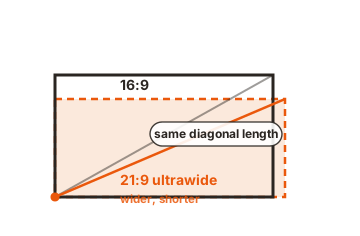
That suits driving, flying and open world games well. It is less useful in competitive shooters, where some titles handle the aspect ratio awkwardly, and older games can letterbox or stretch. It also puts your desk depth under the same pressure a 32 inch does.
Desk depth is the constraint nobody checks
Measure before you buy, because this is what actually decides the size question.
A common desk is 60 to 75 centimetres deep. Subtract the space a monitor stand occupies at the back and the room your keyboard needs at the front, and the eye-to-screen distance you end up with is often less than you assumed. If you cannot get 70 to 80 centimetres between your eyes and the panel, a 32 inch screen will dominate your vision whether you want it to or not.
A monitor arm is the practical fix. Clamping the display to the back edge of the desk removes the stand footprint and buys back 10 to 15 centimetres, which is exactly the distance that separates one size class from the next.
Conclusion
Buy 27 inches at 1440p unless you have a specific reason not to. Go down to 24 or 25 inches if you play competitive shooters seriously or your desk is shallow, and up to 32 inches at 4K if you mostly play single player games and can sit 80 centimetres back. Measure your desk before deciding, pair the size with the right resolution, and remember that moving the monitor 10 centimetres changes the experience about as much as changing the size class does.
For more, see our monitor buying guides.
Frequently asked questions
Is 27 inches too big for competitive gaming?
No, but 24 to 25 inches is faster to scan, which is why tournament setups use it. At 27 inches, sitting slightly further back brings the field of view close to the competitive standard.
Is a 32 inch monitor too big for a desk?
Only if the desk is shallow. It needs about 80 centimetres between your eyes and the screen to feel comfortable. On a 60 centimetre desk it will feel overwhelming unless you use a monitor arm.
What size monitor do professional gamers use?
Almost all competitive FPS players use 24 to 25 inch displays. The size keeps the entire screen within central vision, and the fastest refresh panels are made in that class.
Is 1440p enough at 32 inches?
It works, but it is the weakest of the common pairings. At that size the pixels are visibly larger than on a 27 inch 1440p panel, so 4K is the better match if you can drive it.
Should I get an ultrawide instead?
For sims, driving and open world games, yes. For competitive shooters and mixed use, a 27 inch 16:9 is the safer choice, since aspect ratio support still varies between titles.