Is Acer a Good Monitor Brand? Honest Verdict
Table of contents
Yes, Acer is a good monitor brand, and it is one of the best-value big names for gaming. Acer is a large Taiwanese PC maker, and its Nitro line delivers high refresh rates, Mini LED and fast IPS panels for less than most major brands charge. Its Predator line covers flagship OLED and very high refresh esports screens. Acer’s US warranty page lists three years of limited coverage on monitors. The weak spots are mixed build quality on the cheapest models and a support experience that depends a lot on where you bought.
Who makes Acer monitors?
Acer Incorporated makes them. The company was founded in 1976 in Taiwan, under the name Multitech, and is headquartered in Xizhi, New Taipei City. Its shares trade on the Taiwan Stock Exchange under the code 2353. Acer describes itself as having a presence in more than 160 countries.
Monitors are only one part of the business. Acer is best known for laptops and desktops, and monitors sit alongside them as a major product line. Like most PC brands, Acer does not rely on a single panel factory. It buys panels from several suppliers and sells them under its own model names, which is why one Acer series can mix IPS, VA and OLED screens.
That scale is the main difference between Acer and budget-only names. Acer has decades of history, a US subsidiary (Acer America) that handles the warranty, and wide retail distribution. Value brands like Sceptre compete harder on price, but with a much smaller company behind them.
Acer’s monitor lineup in 2026
Acer splits its range into gaming, everyday and professional lines. The names matter, because quality and features change a lot between them.
| Line | Who it is for | Examples from Acer |
|---|---|---|
| Predator | Flagship gaming: OLED, top esports speed, premium design | Predator X34 F1: 34 inch QD-OLED, 3440 x 1440, 360Hz. Predator XB253Q U1: 1080p at 1000Hz, announced September 2026 |
| Nitro | Value gaming with high refresh rates and modern features | Nitro XV273U F5: 27 inch QHD IPS, up to 540Hz. Nitro XV275U Z2: 27 inch QHD IPS, 1,152-zone Mini LED |
| Business (CB series) | Office desks that need IPS, USB-C or a better stand | CB272K: 27 inch 4K IPS, 60Hz. CB273U: 27 inch QHD, 75Hz. CB241Y: 23.8 inch 1080p with USB-C |
| Essential (SA, KB series) | Low-cost home and office screens | SA272 HBI: 27 inch 1080p VA, 100Hz, FreeSync |
| ProDesigner | Photo, video and design work | ProDesigner PE270X P: 27 inch 5K Mini LED, announced for North America in 2027 |
Acer launches new models several times a year, and many names differ by only one letter or number. A Nitro XV273U and a Nitro XV275U are very different screens, so always match the full model code on the listing to the spec sheet before you buy.
Older creator models carried the ConceptD name. You will still find them in stock and in Acer’s support pages, but new creator screens now launch under ProDesigner.
Acer Nitro vs Predator
Nitro is the value gaming line, and Predator is the flagship. Both target gamers, so the real difference is how far each pushes speed, panel quality and design.
Nitro is where Acer is most competitive. You get features that used to be flagship-only, such as Mini LED local dimming and dual-mode panels that trade resolution for a higher refresh rate. Acer’s Nitro XV273U F5, for example, is rated up to 540Hz at QHD. For most players, a 1440p Nitro at 165Hz to 280Hz is plenty, and our guide on whether a 165Hz monitor is good for gaming explains where the gains start to shrink.
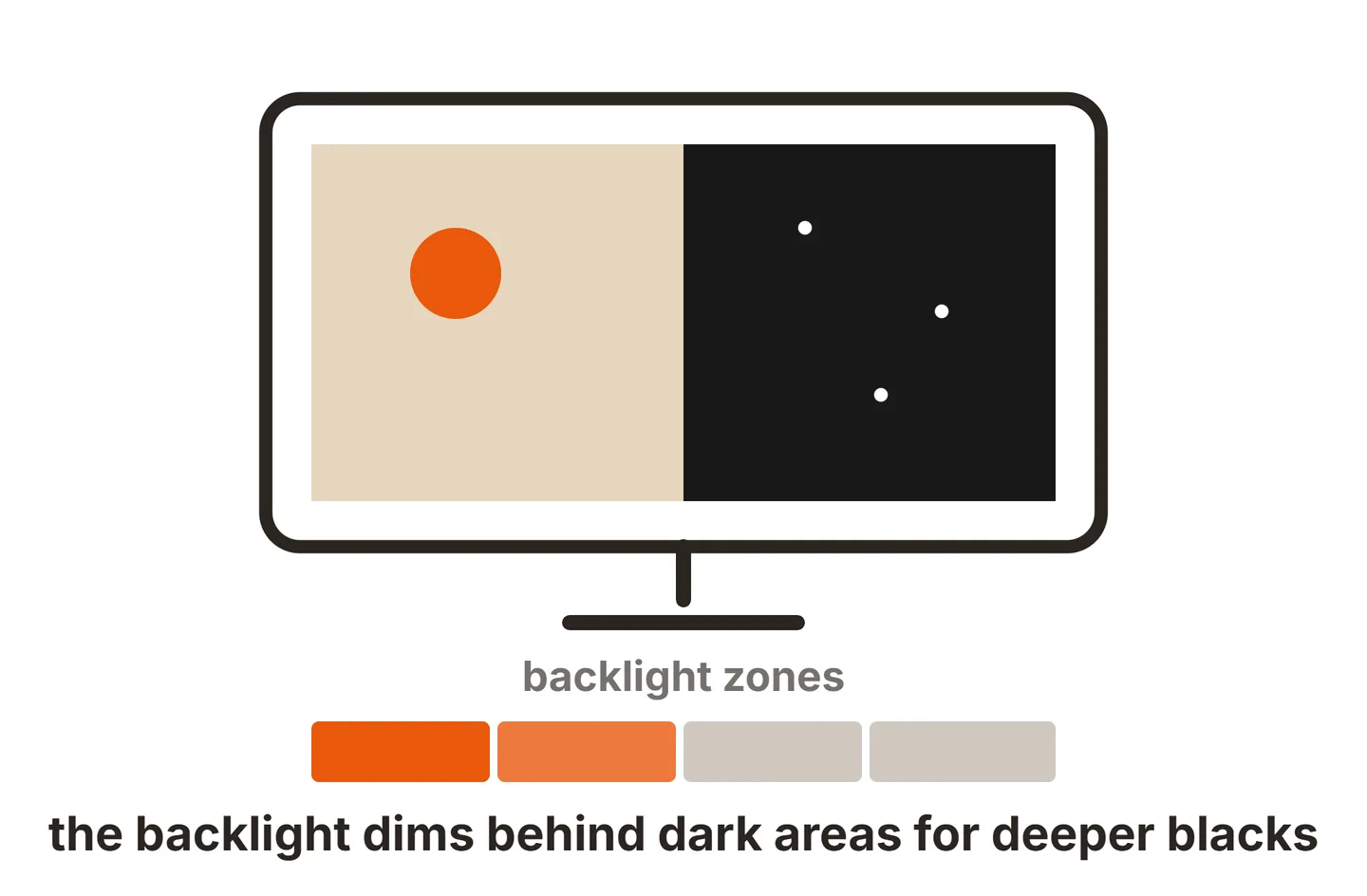
Predator is where Acer puts its best panels. That includes QD-OLED screens like the Predator X34 F1, which Acer rates at 360Hz on a 34 inch 3440 x 1440 panel, and esports models that chase extreme refresh rates. Predator models also get Acer’s most premium styling. If you want OLED, read up on HDR on OLED monitors before you choose between OLED and Mini LED.
Almost every Nitro and Predator model supports adaptive sync, usually listed as AMD FreeSync on the spec sheet, which stops tearing when your frame rate moves around.

What Acer does well
Acer’s biggest strength is value from a large, established brand. A few points stand out across the range.
- Gaming specs for the money. Nitro models regularly bring Mini LED, fast IPS and very high refresh rates to mid-range prices.
- A wide range. Acer covers 1080p office screens, 4K business monitors, ultrawides, QD-OLED and 5K creator panels, so you can stay with one brand across a whole desk.
- A real warranty. Three years of limited coverage in the US is longer than many value brands give.
- OLED burn-in cover. Acer states it covers OLED burn-in for three years on its monitors, which matters for a panel type that can wear over time.
- Easy to find. Acer sells through its own US store and most major retailers, so returns and price matching are simple.
Where Acer falls short
The trade-offs mostly show up at the low end of the range.
- Basic stands on cheap models. Many Essential monitors only tilt. If you need height adjustment, look at the Business CB models, a higher Nitro model, or a VESA arm.
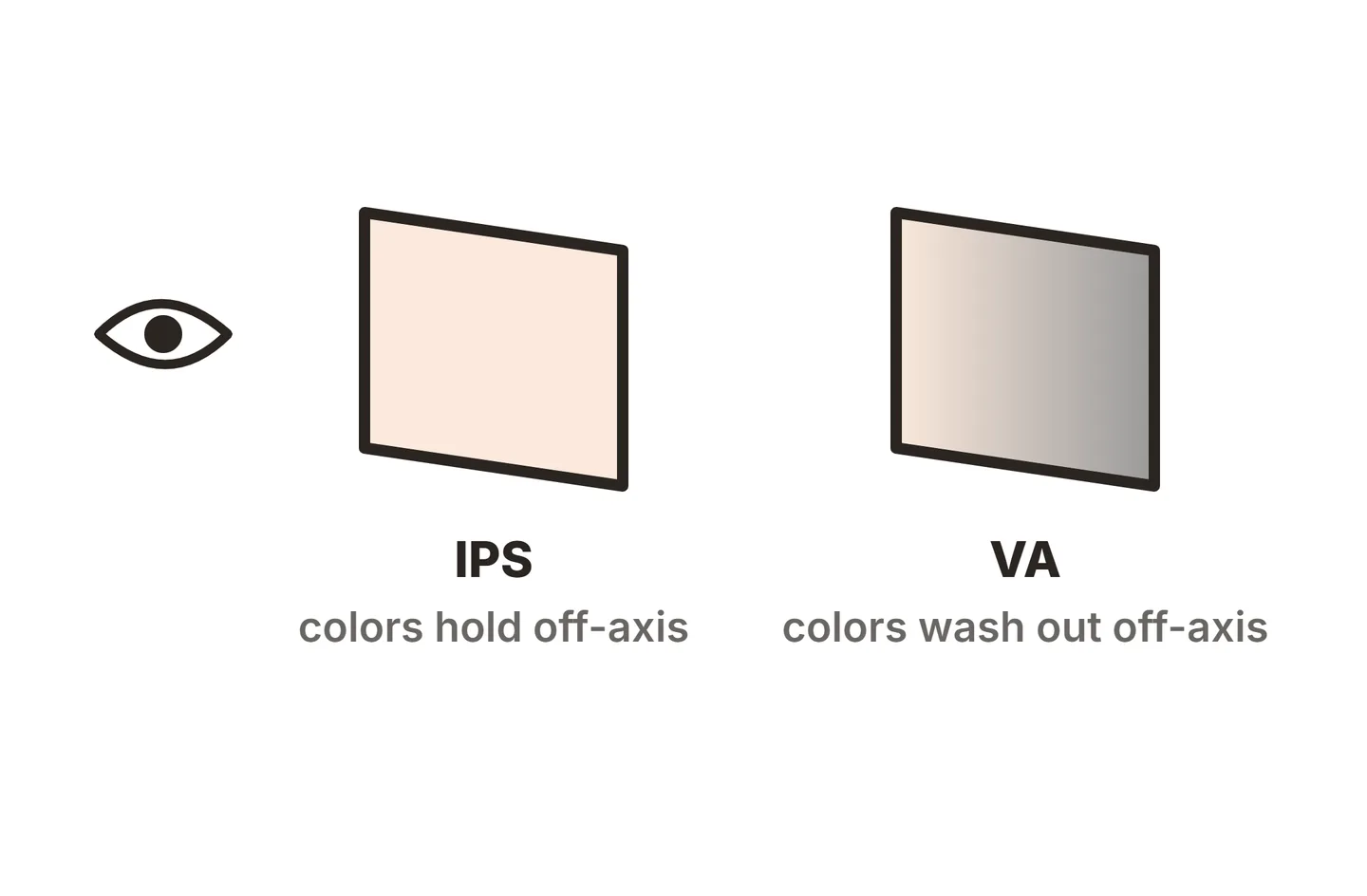
- Mixed panel types within a line. A Nitro can be IPS or VA. VA gives deeper contrast but can smear in fast dark scenes, so check the panel type for your exact model.
- Picture modes that change brightness. Some Acer monitors ship with dynamic features like ACM. Our guide to Acer’s ACM setting explains why you may want it off for steady brightness and accurate color.
- HDR labels on budget screens. An HDR 400 badge accepts HDR signals but lacks the brightness and dimming of a real HDR display. Only the Mini LED and OLED models give a convincing HDR picture.
- Support quality varies. Warranty service runs through Acer America, and turnaround depends on the model, the fault and the shipping. Retailer returns are usually faster for problems you spot early.
Acer monitor warranty and pixel policy
Acer’s US limited warranty page lists monitors, consumer and commercial, under a three-year limited warranty. The same page links Acer’s commitment to cover OLED burn-in for three years on Acer monitors.
Acer’s US warranty agreement adds a few conditions worth knowing:
- It covers the original purchaser only and is not transferable.
- It applies to products bought in the US or Canada from Acer or an authorized reseller.
- Your sales receipt is the proof of purchase date, so keep it.
- Acer can repair the monitor, replace it with a comparable product, or refund the price less depreciation.
Acer also publishes a defective pixel policy. On most models, a small number of bad sub-pixels is allowed before a replacement qualifies, and some premium professional models carry a zero bright dot standard. The exact allowance depends on the model and the region, so check the policy on Acer’s support site for your country before you file a claim.
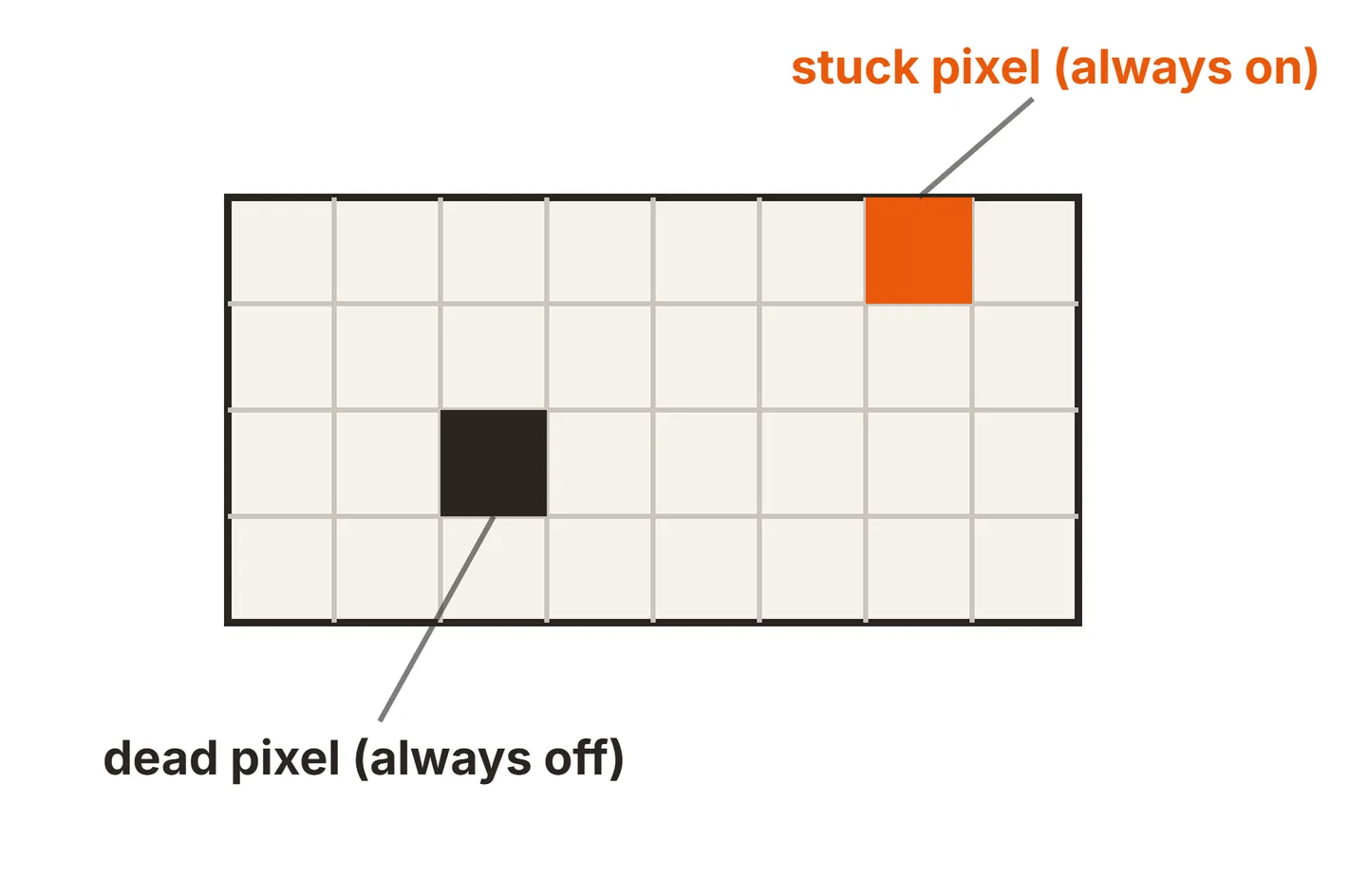
Because the pixel policy allows a few defects, the store return window is often your best protection. Our guide to LED monitor dead pixels shows how to test a new screen and what can be fixed.
Acer vs ASUS vs LG vs Dell
All four are major brands with large ranges, so the choice comes down to the line, not the logo. Here is how they compare at a high level.
| Brand | Main monitor lines | Where it tends to win |
|---|---|---|
| Acer | Nitro, Predator, Business CB, Essential, ProDesigner | Gaming features for less, especially Mini LED and high refresh Nitro models |
| ASUS | ROG, TUF Gaming, ProArt, everyday models | A wide premium gaming range and a dedicated creator line |
| LG | UltraGear, UltraFine, UltraWide | OLED gaming and ultrawide office screens |
| Dell | Alienware, UltraSharp, everyday Dell models | Office and business monitors with strong stands and USB-C hubs |
For gaming on a budget, Acer’s Nitro range is often the cheapest way into a given spec from a major brand. ASUS and LG compete hardest at the top end, and Dell’s UltraSharp line is the usual pick for office desks that want a polished, fully adjustable screen. Warranty terms vary by brand, line and region, so compare the current terms on each maker’s site for the exact model you are weighing.
Against value brands, Acer usually costs a little more but gives a bigger company and longer coverage. Our verdicts on KTC and Koorui show how those names trade support for price.
Which Acer monitor should you buy?
Match the line to what you do most.
- Budget or mid-range gaming: a 27 inch 1440p Nitro. It is the sweet spot of Acer’s range.
- HDR gaming without OLED prices: a Nitro Mini LED model, such as the XV275U Z2.
- Competitive esports: a high refresh Predator or the fastest Nitro, and use DisplayPort to reach the full rate.
- OLED for games and films: a Predator QD-OLED, with the three-year burn-in coverage as a safety net.
- Office work: a Business CB model for IPS, USB-C and a better stand, or an Essential SA model if price matters most.
- Photo and video work: look at ProDesigner models and calibrate them on arrival.
If your new Acer shows a “cable not connected” message on day one, our Acer cable not connected fix walks through the input and cable checks.
Conclusion
Acer is a good monitor brand, and one of the strongest value picks among the big names. Buy a Nitro for budget and mid-range gaming, a Predator for OLED or top esports speed, and a Business CB model for office work. Acer’s US site lists a three-year limited warranty on monitors and three years of OLED burn-in cover, so buy from an authorized seller and test the screen in the first week. For more brand verdicts, browse our monitor buying guides or visit the SubInsider home page.
Frequently asked questions
Is Acer a Chinese company?
No. Acer is a Taiwanese company. It was founded in 1976, is headquartered in New Taipei City, and its shares trade on the Taiwan Stock Exchange under the code 2353. Like most PC brands, it uses panels and factories from several suppliers across Asia.
How long is the Acer monitor warranty in the US?
Acer's US warranty page lists a three-year limited warranty on consumer and commercial monitors, and three years of OLED burn-in coverage on Acer monitors. It applies to the original buyer who purchased from Acer or an authorized reseller, so keep your receipt as proof of the purchase date.
What is the difference between Acer Nitro and Predator?
Nitro is Acer's value gaming line, built to hit high refresh rates and useful features at lower prices. Predator is the flagship gaming line, with the fastest esports panels, QD-OLED screens and the most premium designs. Both are gaming monitors, so pick by budget and the exact panel you want.
Is Acer better than ASUS for monitors?
Neither wins across the board. Acer often costs less at a given gaming spec, especially in the Nitro range. ASUS has a wider spread of premium ROG models and its ProArt line for creators. Compare the exact models, panel type and current warranty terms rather than the logo.
Are Acer monitors reliable?
Generally, yes, and the three-year US warranty covers the most likely failures. As with any brand, quality varies a little between units, more so on cheaper models. Test a new Acer for dead pixels, backlight bleed and the full refresh rate while the store return window is still open.