1500R Curvature Explained: 1000R vs 1800R and More
Table of contents
1500R curvature means the screen is shaped like a slice of a circle with a 1,500 mm, or 1.5 meter, radius. The lower the number, the tighter the curve: 1000R wraps around you more than 1500R, and 1800R is gentler still. For most curved monitors between 27 and 34 inches, 1500R is a sensible middle ground between subtle and dramatic.
What the R number actually measures
Every curved monitor is a section of an imaginary circle. The R rating tells you the radius of that circle in millimeters, so 1800R means 1,800 mm and 1000R means 1,000 mm. The Wikipedia entry on curved screens describes the same convention: the figure is the radius, written with an R instead of a unit.
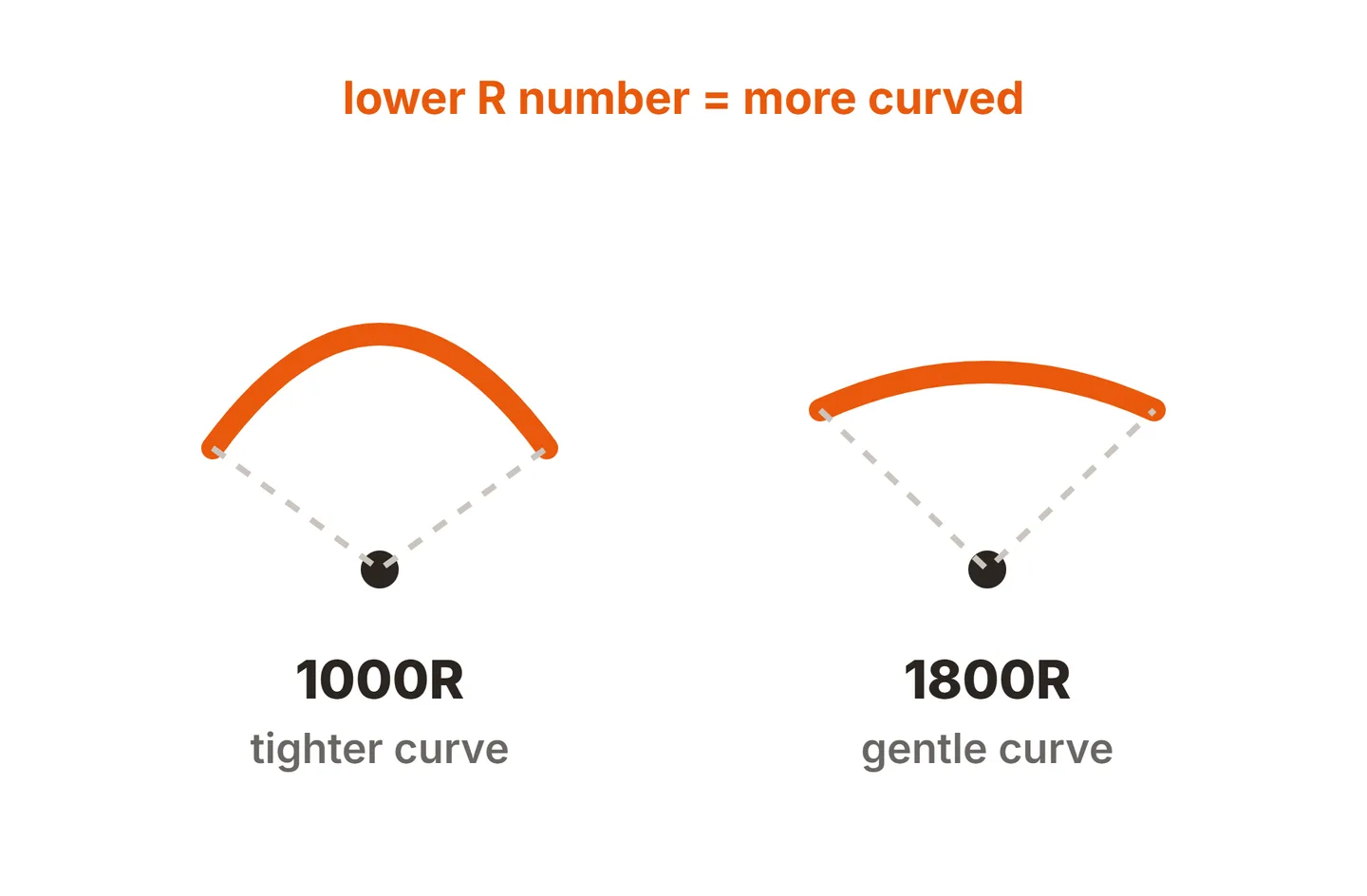
Because it is a radius, the scale runs backwards from what many people expect. A small circle bends sharply, a huge circle is almost flat. That is why a 1000R monitor looks dramatically curved next to an 1800R one, and why a flat screen is sometimes described as having an infinite radius.
A useful way to picture the difference is how far the edges of the screen come toward you. Working out the geometry for a 34 inch ultrawide, which is about 79 cm wide, gives these rough figures for how far forward each edge sits compared with the center:
- 2300R: about 3.5 cm
- 1800R: about 4.5 cm
- 1500R: about 5 cm
- 1000R: about 8 cm
- 800R: about 10 cm
On a narrower 27 inch screen, every one of those numbers roughly halves, which is why curves feel far more obvious on wide panels.
800R vs 1000R vs 1500R vs 1800R at a glance
Here is how the common ratings compare. The size ranges are typical, not strict rules, since manufacturers mix and match.
| Rating | Radius | How it feels | Usually found on |
|---|---|---|---|
| 800R | 0.8 m | Very strong wrap, dramatic | A few large gaming ultrawides |
| 1000R | 1 m | Strong, clearly wraps around you | 34 to 49 inch gaming ultrawides |
| 1500R | 1.5 m | Moderate, noticeable but easy to adapt to | 27 to 34 inch curved models |
| 1800R | 1.8 m | Gentle, subtle | 24 to 32 inch budget and office curved models |
| 2300R and up | 2.3 m or more | Barely curved | Some large office ultrawides |
| Flat | None | No wrap, straight lines stay straight | Most monitors of every size |
1000R vs 1800R curvature: the real difference
This is the comparison most shoppers face, because the two numbers are the most common on mainstream curved monitors, including budget brands like Sceptre that sell some of the cheapest curved panels.
1000R is the immersive option. On a wide screen it pulls the far edges toward your peripheral vision, so a racing game or a big open world feels like it surrounds you. The downside is that it is obvious. Grids, spreadsheets and long horizontal lines look bowed, and it can take a few days to stop noticing the bend.
1800R is the conservative option. On a 27 inch screen many people forget it is curved after an hour. It still trims a little of the distance difference between the center and the edges, but it behaves almost like a flat screen for documents and browsing.
1500R sits between them, which is why it is so common on 27 and 34 inch models. It gives you a visible curve without the strong distortion of 1000R.
Which curve suits which size and distance
A common rule of thumb says the radius should be roughly close to how far you sit from the screen. A 1000R panel is designed with a viewer about a meter away in mind, and an 1800R panel suits someone further back. In practice most people sit somewhere around an arm’s length from the screen, which is the distance the UK’s HSE guidance on good posture suggests, so treat the rule as a loose guide rather than a formula.

As a starting point:
- 24 inch: flat is usually best. If you want a curve, 1800R is plenty.
- 27 inch: flat or 1800R for work, 1500R if you lean toward games and films.
- 32 inch 16:9: 1500R or 1800R both work. The extra width starts to justify a curve.
- 34 inch ultrawide: 1500R to 1800R is the comfortable range, 1000R for an immersive gaming focus.
- 45 to 49 inch super ultrawide: 1000R or tighter, because a screen that wide would leave the edges far away without a strong curve.
Size and distance work together, so it helps to know how monitor size is measured before comparing curved and flat models. If gaming is the main use, our guide to a good size monitor for gaming covers distance and field of view in more depth.
What is the point of a curved monitor?
The honest answer is that a curve matters more as a screen gets wider. It was never a must-have feature on a standard 24 inch panel.
The benefits
- More even viewing distance. On a wide flat screen, the corners are noticeably further from your eyes than the center. A curve brings them closer, so text near the edges is easier to read without leaning.
- Immersion. Games, sims and films fill more of your peripheral vision, which is the main reason gaming ultrawides use tight curves.
- Less head turning on very wide screens. Super ultrawides would be awkward to use flat, because the edges would sit at a steep angle to your eyes.
- A single wide screen can replace two monitors without the bezel gap in the middle.
The drawbacks
- Glare and reflections behave differently. Depending on where your lamps and windows sit, a curve can either dodge a reflection or stretch it across a wider band of the screen, so placement matters. The Cornell ergonomics guide advice still applies: keep bright windows and lamps out of the screen’s reflection.
- Wall mounting is awkward. The edges stick out from the wall, and some curved models use unusual mounts. Check the back for a standard VESA pattern before planning a wall or arm install.
- They need more desk depth. A wide curved monitor takes up more front-to-back space than a flat one, especially with a large stand.
- Not ideal for design and drafting. If you judge straight lines in CAD, layout or photo work, a curve makes that harder. Flat is the better tool.
- Viewing as a group is worse. Someone sitting beside you sees the near edge bowing toward them.
One more thing a curve is not good for: rotating the screen. Turning a curved monitor sideways puts the bend on the wrong axis, as we explain in our article on putting a curved monitor vertical.
How to choose
Ask three questions. How wide is the screen? The wider it is, the stronger the curve it can carry. What will you do most? Gaming and films favor stronger curves, while spreadsheets, coding and design favor gentle curves or flat. And how deep is your desk? If space is tight, a flat panel on an arm leaves you the most room.
If you are unsure, 1500R to 1800R is the safest pick for a curved monitor up to 34 inches, and flat remains the default for anything 27 inches or smaller used mainly for work. For more on whether that size is right in the first place, see our look at whether a 27 inch monitor is too big.
Conclusion
1500R curvature is a moderate curve based on a 1.5 meter radius. Lower numbers such as 1000R and 800R curve more and suit wide gaming screens, while 1800R and 2300R are subtle enough for everyday work. A curve pays off on wide screens, where it evens out viewing distance and adds immersion, and matters little on small ones. Match the curve to your screen width, your main tasks and your desk, and you will not go far wrong.
You can find more spec explainers in our monitor specs guides, more desk advice in our monitor setup guides, or start from the SubInsider monitor knowledge base homepage.
Frequently asked questions
What does 1500R mean on a monitor?
It means the panel follows the edge of a circle with a 1,500 mm radius. If you kept bending the screen until it closed into a full ring, that ring would be 3 meters across. It is a moderate curve, tighter than 1800R and gentler than 1000R.
Is 1000R or 1800R better?
Neither is better in general. 1000R wraps more strongly and suits large ultrawides and immersive gaming at a typical desk distance. 1800R is subtle, easier to get used to and kinder to straight lines, which makes it the safer choice for a 24 to 27 inch screen used for mixed work.
Is 800R too curved?
For most people and most tasks, yes. 800R is the most aggressive curve found on desktop monitors and is aimed at very wide gaming screens. It looks dramatic and immersive, but spreadsheets, documents and design work show visible bending, and it is harder to share the screen with someone beside you.
Do curved monitors reduce eye strain?
They can help a little on wide screens, because the edges sit closer to the same distance as the center, so your eyes refocus less as you look across. They do not fix poor posture, brightness or lighting. On a 24 inch screen the difference is small enough to ignore.