Dust Under Monitor Screen: What It Is and How to Fix It
Table of contents
A speck that will not wipe off is sitting under the front layer of the panel, usually between the LCD and the diffuser sheet behind it. Most of the time it is either dust that got in through a vent or a very small insect that walked in on its own. Neither is reachable without opening the monitor, and opening the monitor is rarely the right call. Here is how to confirm what you are looking at and what your realistic options are.
First, confirm it is actually under the glass
Three quick checks settle this before you touch anything else.
Clean the surface with a dry microfibre cloth. A surprising share of “dust inside the screen” reports end here, because a speck caught in the texture of an anti-glare coating looks exactly like something trapped deeper.
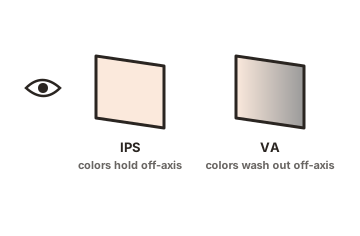
Then move your head from side to side while watching the mark. Anything printed on the surface stays locked to the same point on the image. Something sitting a layer or two back shifts slightly against the picture as your angle changes, the same way a scratch on a window moves against the view behind it. That parallax is the clearest sign it is inside.
Finally, put a full-screen white image up, then a black one. Debris between the backlight and the LCD shows as a dark speck or a soft shadow on white and usually vanishes on black, because there is no light behind it to block.
What is actually in there
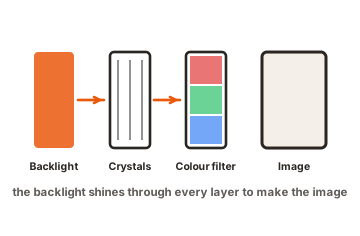
A monitor panel is a stack. At the front sits a protective layer bonded to the LCD cell itself, which is why nothing that lands on the outside can migrate inward. Behind the LCD sits a diffuser sheet that spreads light evenly, and behind that the backlight and light guide plate. The gap between the diffuser and the LCD is where loose particles end up, silhouetted against the light.
They get in because monitors are not sealed boxes. Vents and bezel seams exist so heat can escape, and those openings are wide enough for fine dust and for insects. Thrips, also called thunderflies, are the usual offender: slender, roughly one to two millimetres long, drawn to light and warmth, and most active in warm weather. A monitor at night is one of the brightest warm objects in the room.
An iFixit disassembly guide for a thin-bezel monitor shows the layers clearly, including the point that the front layer is glued to the LCD and cannot be separated, so anything trapped there stays there.
A new monitor can arrive with a speck already inside, and that is not something you caused. Panels are made in clean rooms, but final assembly, packing and shipping are not equally sterile, and a unit spends days being vibrated in a box before it reaches you. A particle that starts at the edge of the diffuser can end up somewhere you will notice it.
Things that look like dust but are not
| What you see | Likely cause |
|---|---|
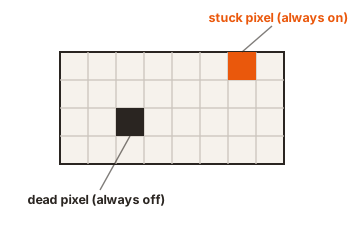
| Sharp black dot, fixed to the image, no parallax | Dead pixel |
| Coloured dot on a black screen | Stuck subpixel |
| Smeared or cloudy patch that changes with light angle | Damaged anti-glare coating |
| Cloudy area that spreads over weeks | Panel delamination |
| Pale patches at the edges on dark scenes | Backlight bleed |
The two worth taking seriously are the last ones. Delamination spreads and cannot be cleaned or repaired, so a cloudy patch that is bigger this month than last is a panel failure, not dirt. Anti-glare damage is usually the result of a cleaning product that stripped the coating, and it does not come back.
Clean the outside properly first
Power the monitor off and unplug it. Wipe with a dry microfibre cloth in one direction, top to bottom. If marks remain, dampen a corner of the cloth with distilled water, never the screen itself, then dry it with a clean section and let it air dry fully before switching back on.
What to keep away from the panel matters more than technique. Paper towels and tissues have abrasive fibres. Window cleaners, ammonia and alcohol strip anti-glare coatings and leave permanent cloudiness. Dell’s guidance on damage from incorrect cleaning methods also lists compressed air alongside the solvents, and notes that damage caused this way is classed as customer induced, which puts it outside warranty cover. That is worth knowing before you aim a can of air at the vents to chase dust out.
If it is a live insect
Act quickly, because a thrip that dies in there leaves a permanent dark mark instead of a moving one.
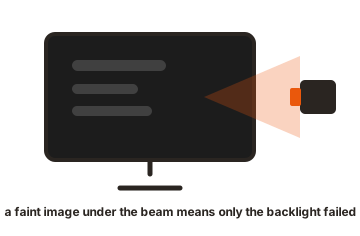
Turn the monitor off and darken the room, then shine a torch at the vents or the bezel edge from outside. The insect follows the light, and with the backlight off, your torch is the only thing worth walking toward. Tilting the monitor and tapping the chassis gently can help it along.
Do not press on the glass. Squashing the insect between the layers turns a temporary nuisance into a permanent blemish, and pressure on an LCD can damage the layers underneath on its own.
When it is dust, the honest options
There are four, in descending order of sense.
- Return or claim it. Debris sealed inside a new panel is a manufacturing issue. Inside the retailer’s return window this is a straight swap with no argument. Under warranty, contact support before doing anything else, since some manufacturers will service a unit with foreign material inside provided nobody has opened it.
- Pay someone. A repair shop will typically open, clean and reassemble a monitor for somewhere around 40 to 80 dollars, in a cleaner setting than your desk and with the right tools. On a cheap monitor that is a large share of the replacement cost, so it makes more sense on an expensive one.
- Open it yourself. Possible, and well documented, but the odds are against you. The front layer is bonded to the LCD, so you can only reach the diffuser side, and every reassembly is a fresh chance to trap new particles. This also ends any warranty claim.
- Leave it. One speck disappears against almost all real content and only shows on bright, flat backgrounds. Plenty of people notice it once, then never again.
Keeping the next one out
Prevention is easier than any of the above, and it comes down to making the monitor a less appealing destination.
- Switch it off when you are done. A dark, cool panel attracts neither insects nor convection-driven dust.
- Mind the season. Thrips peak in warm weather. Window screens and closed windows on still summer evenings do most of the work.
- Keep air away from the vents. A desk fan pointed at the back of a monitor pushes dust straight into it.
- Cover it for long breaks. If a machine sits unused for weeks in a dusty room, a cover is worth the small effort.
Conclusion
Wipe the screen first, then check for parallax by moving your head. If the speck shifts against the image, it is under the front layer, and nothing you do from the outside will reach it. A live insect can often be walked out with a torch and patience. Dust cannot, so the decision is between returning the monitor while you still can, paying a shop, and deciding it does not matter. Opening it yourself is the option that most often makes things worse.
For more, see our monitor troubleshooting guides.
Frequently asked questions
Can dust get inside a sealed LCD panel?
The LCD cell itself is sealed, so nothing reaches the liquid crystal. Dust settles in the space between the LCD and the diffuser sheet behind it, entering through vents and bezel seams that exist for cooling.
Will compressed air blow the dust out?
Rarely, and it carries a cost. The gaps are extremely tight, and several manufacturers list compressed air as an improper cleaning method that voids cover for any resulting damage.
Is dust inside the screen covered by warranty?
Often yes on a new monitor, since debris sealed inside points to assembly rather than use. Contact support before opening anything, because a disassembled monitor is no longer a warranty case.
Will a dead insect decompose and disappear?
Not reliably. There is little moisture inside a display, so remains can sit there for a long time. Getting one out alive is far easier than dealing with it afterwards.
Does dust inside damage the monitor?
No. A speck blocks a little light and nothing more. It is a cosmetic problem, so the only question is whether it bothers you enough to act while a return or warranty route is still open.