LCD Monitor Without Backlight: How It Works and What to Buy
Table of contents
An LCD monitor without a backlight does exist. It is called a reflective LCD, or RLCD, and instead of shining light through the panel from behind, it bounces the light already in your room back through the pixels, the same trick a calculator display has used for decades. A small number of full-color RLCD desktop monitors are on sale today, aimed at people chasing less eye strain, outdoor readability, or very low power use.
The phrase also covers two other situations. If you want any monitor that simply has no backlight layer, every OLED qualifies, because its pixels emit their own light. And if your existing monitor suddenly seems to have no backlight, with a faint ghost of an image on a black screen, that is a repairable hardware failure, not a feature. This guide covers all three: how a backlight-free LCD works, what you can buy, and how to diagnose a backlight that just died.
Why an LCD normally needs a backlight
Liquid crystal pixels do not make light. Each one is a tiny valve: it twists to let light pass, block it, or filter it through red, green, and blue subpixel filters. Something still has to supply the light those valves control. In a normal monitor, that something is a white LED backlight sitting behind the panel (older monitors used fluorescent tubes called CCFLs). Remove that layer and a standard monitor shows nothing but a black rectangle.
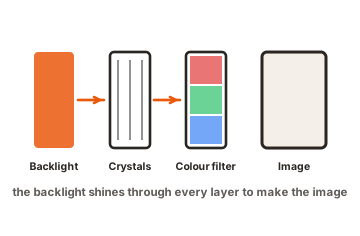
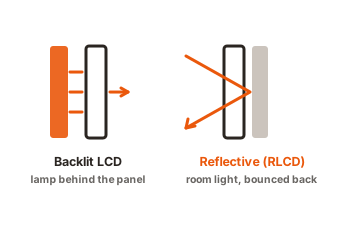
The valves themselves, though, do not care where the light comes from. Aim light at the front of the panel instead of the back, add a mirror-like layer behind the pixels, and the same crystals can shape reflected room light into an image. That is exactly how the earliest LCDs worked: digital watches and pocket calculators have always been backlight-free, reflective LCDs, readable anywhere there is light to reflect (the backlight entry covers this history well).
So the honest answer to “can an LCD work without a backlight” is yes, as long as it is built for reflection. A panel designed for a backlight cannot be converted by simply switching the light off; the reflective layer has to be part of the design.
RLCD: the desktop monitor that runs on room light
A reflective LCD replaces the backlight with a reflective layer behind the liquid crystals. Room light passes through the pixels, hits that layer, and bounces back out through them, so the pixels shape light on the way in and the way out. The result looks less like a glowing screen and more like a printed page that updates 60 times a second. The best-known desktop example is Sun Vision Display’s rE monitor, a 32-inch full-color RLCD sold specifically as a backlight-free, eye-friendly display, and the first color RLCD monitor of its size.
A second design in the same spirit is the Eazeye monitor, which takes a different route to the same goal: its housing leaves the rear of the LCD open so ambient light floods in from behind and acts as a natural backlight, with a small built-in light bar for dark rooms. Its designer claims roughly a tenth of the power draw of a conventional display.
The trade-offs are the flip side of the physics. A reflective screen is only as bright as the room around it, so a dim office produces a dim image, and many RLCD owners pair the monitor with a desk lamp aimed at the screen. Colors look muted next to a backlit panel, closer to print on paper than to a glowing display. And the harder the light, the better it gets: unlike every normal monitor, an RLCD is at its best in direct sunlight.
OLED: no backlight, but not what most people mean
If the requirement is simply “a monitor with no backlight layer,” OLED already meets it and is available everywhere. Each OLED pixel emits its own light, so there is no backlight to shine through anything: black pixels are switched off entirely, which is where OLED’s perfect contrast comes from.
But OLED does not deliver what most people searching for a backlight-free monitor are actually after. The panel still beams light straight at your eyes, still competes with sunlight (and loses), and still draws meaningful power on bright content. It removes the backlight as a component, not as an experience. If your goal is deep blacks and contrast, OLED is the answer. If your goal is a screen that feels like paper, it is not. One extra note for the light-sensitive: some OLED panels dim by rapidly pulsing their pixels (a technique called PWM), which a minority of users perceive as flicker, one more reason the eye-comfort crowd gravitates toward reflective screens.
E-ink: the other paper-like option
E-ink monitors sit one step beyond RLCD on the paper-like scale. They are reflective too, and they hold an image with almost no power at all, which is why e-readers run for weeks. Dedicated e-ink desktop monitors exist for writers, coders, and readers who want the gentlest possible screen.
The costs are steep for general use: most e-ink panels are grayscale or show washed-out color, refresh slowly enough that video and fast scrolling smear, and carry high prices for their size. An RLCD refreshes like a normal monitor and shows real color, which is why it occupies the middle ground between a standard LCD and e-ink rather than competing head-on with either. Prices reflect the niche as well: e-ink monitors of even modest size often cost as much as large, high-end conventional displays.
Here is how the four technologies stack up:
| Technology | Light source | Best for | Watch out for |
|---|---|---|---|
| Standard LCD | LED backlight behind the panel | Everything, everywhere, cheaply | Light aimed at your eyes; washed out in sunlight |
| RLCD | Ambient room light, reflected | Eye comfort, sunlight, low power | Needs a bright room; muted colors |
| OLED | Self-emissive pixels | Contrast, movies, gaming | Still shines at your eyes; burn-in care |
| E-ink | Ambient light, reflected | Reading and writing text | Slow refresh; limited or no color |
Why people go looking for this
- Eye comfort. A backlight is a lamp pointed at your face for eight hours a day. A reflective screen emits nothing; you see it the way you see a book, lit by the room. People with light sensitivity and screen-induced eye strain are the core audience for RLCD and e-ink displays.
- Sunlight. Backlit monitors fight the sun and lose. Reflective screens use it, getting clearer as the light gets stronger, which matters for outdoor desks, balconies, boats, and camper setups.
- Power. The backlight consumes most of the energy in a typical LCD monitor, so removing it cuts consumption drastically. That matters for battery and solar setups more than for a grid-powered desk.
Buying an RLCD: check these four things first
Reflective monitors are a small market with strong opinions on both sides, so a little preparation prevents most disappointments:
- Your lighting, not the monitor, sets the brightness. Plan the desk before the purchase. A window to the side or a decent lamp aimed at the screen is part of the setup, and a dim corner will disappoint no matter which model you pick.
- Match it to the work. Text is where reflective screens shine: writing, coding, spreadsheets, and reading. Color-critical photo or video editing is the wrong job, because colors render muted and shift with the room’s light.
- Check the front-light or light-bar option. Some designs include a built-in light for dark rooms, the Eazeye’s light bar being one example. If you work at night, treat that as a requirement rather than a bonus.
- Buy where returns are easy. No spec sheet can predict how your eyes will respond to a reflective screen, and the ownership pattern is strongly love-it-or-return-it. A solid return window is worth more here than with any ordinary monitor.
If your monitor’s backlight just died
Some people typing this phrase are not shopping; their monitor has become an LCD without a backlight overnight. The symptom is distinctive: the computer runs, the monitor’s power light is on, but the screen looks black. The test takes ten seconds. Shine a flashlight at an angle onto the screen while something should be displayed. If you can make out a faint, dark image in the beam, the panel and the video signal are fine, and the backlight system has failed.
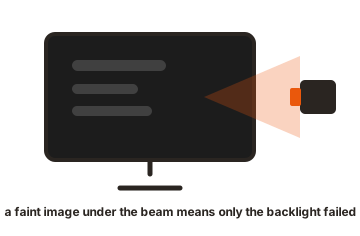
On older monitors with CCFL tubes, the usual culprit is the inverter board that powers the tubes, a cheap and commonly replaced part in monitors of that era. On modern LED-backlit monitors, failures point to the LED driver circuit or strips, and a repair shop can often fix either for far less than a new monitor. A screen that shows no image at all under the flashlight, rather than a faint one, has a different problem, likely the panel or the signal path, and is usually not worth repairing on an inexpensive monitor.
One caution: opening a monitor exposes capacitors that can hold a charge after unplugging, and CCFL inverters run at high voltage. Diagnosis with a flashlight is safe for anyone; the repair itself belongs with someone comfortable working inside mains-powered electronics.
Conclusion
An LCD monitor without a backlight is real: reflective RLCD monitors light their pixels with the room instead of a lamp, trading brightness independence for paper-like comfort, sunlight readability, and tiny power draw. OLED removes the backlight component but still shines light at you, and e-ink pushes the paper feel further at the cost of speed and color. And if your own monitor just lost its light, the flashlight test tells you in seconds whether a cheap backlight repair will bring it back.
If the screen is dark but the flashlight shows nothing, start with our no-signal checks instead, or browse all our monitor troubleshooting guides.
Frequently asked questions
Can any LCD screen work without a backlight?
Only if it is built for reflection. Reflective LCDs place a mirror-like layer behind the pixels so ambient light forms the image, which is how calculators and RLCD monitors work. A standard monitor's panel shows nothing usable with its backlight removed, because no reflective layer exists.
Are backlight-free monitors better for your eyes?
Many users find them dramatically more comfortable, because the screen emits no light of its own and behaves like paper under room lighting. Comfort varies by person and by lighting, though; a reflective screen in a badly lit room can force squinting of its own.
What's the difference between RLCD and e-ink?
Both reflect ambient light instead of using a backlight. RLCD refreshes at normal monitor speeds and shows real color, so it handles video and everyday desktop work. E-ink refreshes slowly and is mostly grayscale, but holds an image with almost no power and looks the most paper-like.
Does OLED count as a monitor without a backlight?
Technically yes: OLED pixels emit their own light, so no backlight layer exists. But an OLED still shines light directly at your eyes and dims in sunlight, so it does not deliver the paper-like, ambient-lit experience that reflective displays provide.
How do I know if my monitor's backlight is broken?
Shine a flashlight at the powered-on screen at an angle. A faint, dark image in the beam means the panel works and the backlight system (LED driver or, on old monitors, the CCFL inverter) has failed, which is a repairable fault. No image at all points to a different, deeper problem.