Graphics Card for a Triple Monitor Setup: What You Actually Need
Table of contents
For three monitors on a desktop, almost any graphics card from the last several years is already enough. Current cards drive four displays and ship with three DisplayPort outputs plus HDMI, so the ports are there and the workload of showing spreadsheets and browser windows is close to nothing. The card only becomes the limiting factor when you want to game across all three at once, and that is a completely different question. Work out which one you are asking before you spend anything.
Nearly every modern card already does three
Look at the output list on a current GPU and the answer is usually sitting right there. NVIDIA’s RTX 50 series carries three DisplayPort 2.1b connectors and one HDMI 2.1b, with a stated maximum of four simultaneous displays, and that pattern holds from the entry models up to the RTX 5090. AMD and Intel cards are built the same way, with four display pipelines and a similar port mix.
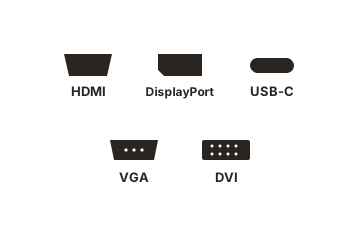
That has been true for years. A card from 2018 will run three monitors just as happily as one from this year, provided the ports match your monitors and the bandwidth covers the resolution and refresh rate you want. So the useful question is not whether a card can do three. It is what you intend to put on them.
What graphics card supports 3 monitors?
Any card that passes three checks will run three monitors. None of them is about raw performance.
- Three physical outputs you can use. Count the ports on the back of the card, not the claims on the box. The usual layout is three DisplayPort and one HDMI, so a graphics card with three DisplayPorts is the norm rather than a special model. A true three HDMI video card is rare; some partner cards carry two HDMI ports, but if all three of your monitors are HDMI only, plan on DisplayPort to HDMI cables or adapters. A passive one is fine for 1080p at 60Hz, while an active DisplayPort to HDMI 2.0 or 2.1 adapter is the safer buy for 4K or high refresh rates.
- A display limit of at least three. This is set by the graphics chip, and the spec page lists it as maximum displays or simultaneous displays. Very old or very cheap cards can stop at two.
- Bandwidth and performance for what you run. Three 1080p screens at 60Hz are easy for almost any current card, integrated graphics included. Three 1440p high refresh screens for gaming need a much stronger card, which the sections below size up.
| Graphics | Typical outputs | Max simultaneous displays |
|---|---|---|
| NVIDIA GeForce | 3x DisplayPort, 1x HDMI (some partner cards add a second HDMI) | 4 |
| AMD Radeon | DisplayPort and HDMI, sometimes USB-C, three to four outputs | 4 on most current cards, up to 6 on some models with MST |
| Intel Arc | 3x DisplayPort, 1x HDMI | 4 |
| CPU integrated graphics | Whatever the motherboard provides, often one to three | Usually 3 or 4, limited by the motherboard's ports |
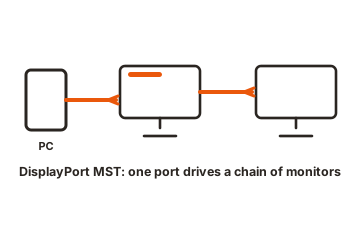
If the card is short a port, two other routes work. DisplayPort MST lets one output feed two or three screens through a hub or monitors with a DisplayPort out, though they share that port’s bandwidth and still count toward the card’s display limit. You can also enable the CPU’s integrated graphics in the BIOS and run one screen from the motherboard, with the caveats covered further down.
What about 6 monitors?
A single current GeForce card cannot drive six displays, since the limit is four whatever adapters or hubs you add. For a 6 monitor GPU setup you need either an AMD Radeon card that lists six displays on its spec page, usually reaching all six through MST hubs, or two graphics cards sharing the screens between them. A four display card plus integrated graphics for the last two also works for desktop use. Our 6 screen monitor setup guide covers the wiring, mounts and costs.
Count pixels, not monitors
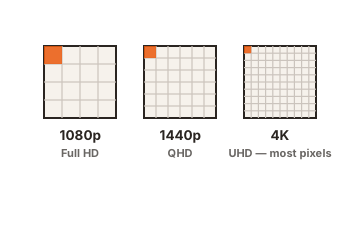
Three screens is not three times the work in every scenario, but when it is, the number that matters is total pixels.
| Setup | Total pixels | Roughly equivalent to |
|---|---|---|
| Three 1080p | 6.2 million | Between one 1440p and one 4K |
| Three 1440p | 11.1 million | About 1.3 times a single 4K |
| Three 4K | 24.9 million | Three times a single 4K |
Three 1080p screens spanned as one surface land between a 1440p and a 4K monitor in rendering cost, which is manageable on a mid-range card. Three 1440p screens are harder than 4K. Three 4K screens spanned for gaming is a demand almost nothing meets at a decent frame rate, which is why it is rare outside of screenshots.
Desktop work and gaming are different problems
For productivity, three monitors ask almost nothing of the GPU. Rendering a static desktop is trivial, and a low-end current card will drive three 4K panels at 60Hz without breaking a sweat. If that is your use case, buy for ports and outputs, not for performance.
Gaming splits into two very different setups. In the first, you game on one screen and keep chat, a browser or a stream on the others. The cost of the extra displays is minor, so size the card for the gaming monitor alone and ignore the other two.
In the second, the game spans all three as one wide surface, using AMD Eyefinity or the equivalent on other cards. AMD’s Eyefinity documentation puts the arithmetic plainly: three 1920x1080 displays in a horizontal group produce a single 5760x1080 desktop. That is the setup that actually needs a serious card, and it mostly makes sense in racing and flight sims where the side screens carry peripheral vision rather than detail.
Ports and bandwidth
Each monitor gets its own port, and each port has its own bandwidth budget. Three displays do not share one pipe, which is why a triple setup rarely runs into signal limits on a modern card.
The DisplayPort version still sets the ceiling per screen. DisplayPort 1.4 on RTX 40 series and older cards carries 32 Gbps. AMD’s RX 7000 series moved to DisplayPort 2.1 at UHBR13.5, or 54 Gbps. RTX 50 series runs DisplayPort 2.1b at UHBR20, which is 80 Gbps. Display Stream Compression stretches all of these well past their raw numbers with no visible loss, so even DisplayPort 1.4 handles 4K at high refresh rates comfortably.
Where people do hit walls is when they stop giving each monitor its own port. An MST hub or a USB-C dock splits a single output between two or three screens, and that one port’s bandwidth now has to cover all of them. Three 4K screens through one DisplayPort will drop to low refresh rates or refuse to run. If the card has three DisplayPorts and an HDMI, use them directly.
One cabling note: DisplayPort to HDMI works passively in that direction, but HDMI output to a DisplayPort input needs an active adapter, and cheap ones are a common source of dropouts.
The parts nobody mentions
Three things catch people out after everything is plugged in.
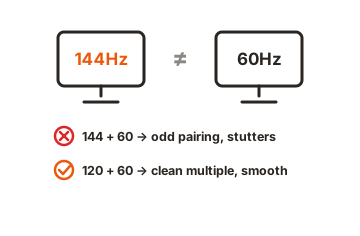
- Idle power. With multiple monitors at mixed refresh rates, GPUs often hold VRAM at full clock to avoid flicker during clock changes. On some cards that pushes desktop idle draw from roughly 20 watts to 90 or more, with the fans and heat to match. Recent drivers have improved this on both brands. If yours misbehaves, running all three at the same refresh rate usually fixes it, and dropping the side screens to 60Hz almost always does.
- VRAM before you start. Three high-resolution desktops consume video memory before a game loads. It is not much, but on an 8GB card at 4K it is enough to notice in a demanding title.
- Variable refresh rate. Adaptive sync generally applies to one display at a time, and mixing refresh rates across screens can introduce stutter on the desktop. Matching panels avoids the whole category of problem.
- Mixed resolutions. Windows sets scaling per display, so a 4K centre screen at 150 percent next to two 1080p screens at 100 percent means windows change size as you drag them between monitors, and older applications can end up blurry. Nothing about the graphics card fixes this. Buying three identical panels does.
You can also run the third monitor from your CPU’s integrated graphics if the card is short a port. It works, but dragging windows between two GPUs can stutter, and some applications handle it poorly. Treat it as a workaround rather than a plan.
What to actually buy
Match the card to what the screens are doing, not to how many there are.
- Three screens for work, no gaming. Any current entry-level card. If your CPU has integrated graphics capable of three outputs, you may not need a card at all.
- Gaming on one, two side screens for everything else. Size the card for the gaming monitor by itself. A mid-range current card handles 1440p high refresh comfortably.
- Gaming spanned across three 1080p screens. Upper mid-range and above, because you are rendering more pixels than a 1440p monitor.
- Gaming spanned across three 1440p screens. Flagship territory, with 16GB of VRAM or more, and expect to use upscaling.
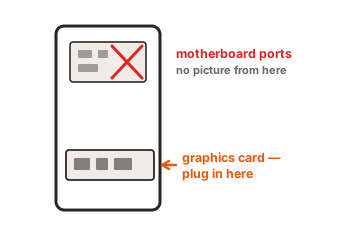
The one thing worth checking before you order is the port list against your monitors’ inputs. A card with three DisplayPorts and one HDMI suits three DisplayPort monitors perfectly and suits three HDMI-only monitors badly.
Conclusion
Three monitors on the desktop is a ports question, and nearly every modern graphics card already answers it with three DisplayPorts, an HDMI and support for four displays. Gaming across all three is a performance question, and there the honest measure is total pixels: three 1440p screens are harder to drive than a single 4K one. Decide which you are doing, give every monitor its own port, and match the refresh rates so the card can idle properly.
For more, see our monitor setup guides.
Frequently asked questions
Can any graphics card run three monitors?
Nearly all modern ones can. Current NVIDIA, AMD and Intel cards support four simultaneous displays and ship with three DisplayPort outputs plus HDMI. Older or very low-end cards may top out at two, so check the output list.
Do I need a powerful GPU for three monitors?
Only for gaming across all three. Desktop work on three screens is almost free in GPU terms, so an entry-level card handles it. Spanning a game across three panels is where the demand rises sharply.
Is one graphics card better than two for triple monitors?
One card, in almost every case. Splitting displays between two cards adds complexity, and spanned gaming modes cannot cross graphics cards anyway. Use a single card with enough ports.
Will an MST hub or dock run three monitors?
Yes, but they share one port's bandwidth between the displays, which limits resolution and refresh rate. Connecting each monitor to its own output on the card is always better where you have the ports.
Why does my GPU run hot with three monitors idle?
Mixed refresh rates often keep the memory clock pinned at full speed to prevent flicker. Setting all three displays to the same refresh rate, or lowering the side screens, usually brings idle power and fan noise back down.
Is there a graphics card with 3 HDMI ports?
A few exist, but they are rare. Most cards have three DisplayPort outputs and one or two HDMI. For three HDMI monitors, use DisplayPort to HDMI cables or adapters, choosing active ones for 4K or high refresh rates.